

My AI Skills Folder Is a Junkyard. Four Cars Still Run.
I hadn’t looked in months. One command told me why that was a mistake.


Look at this number…
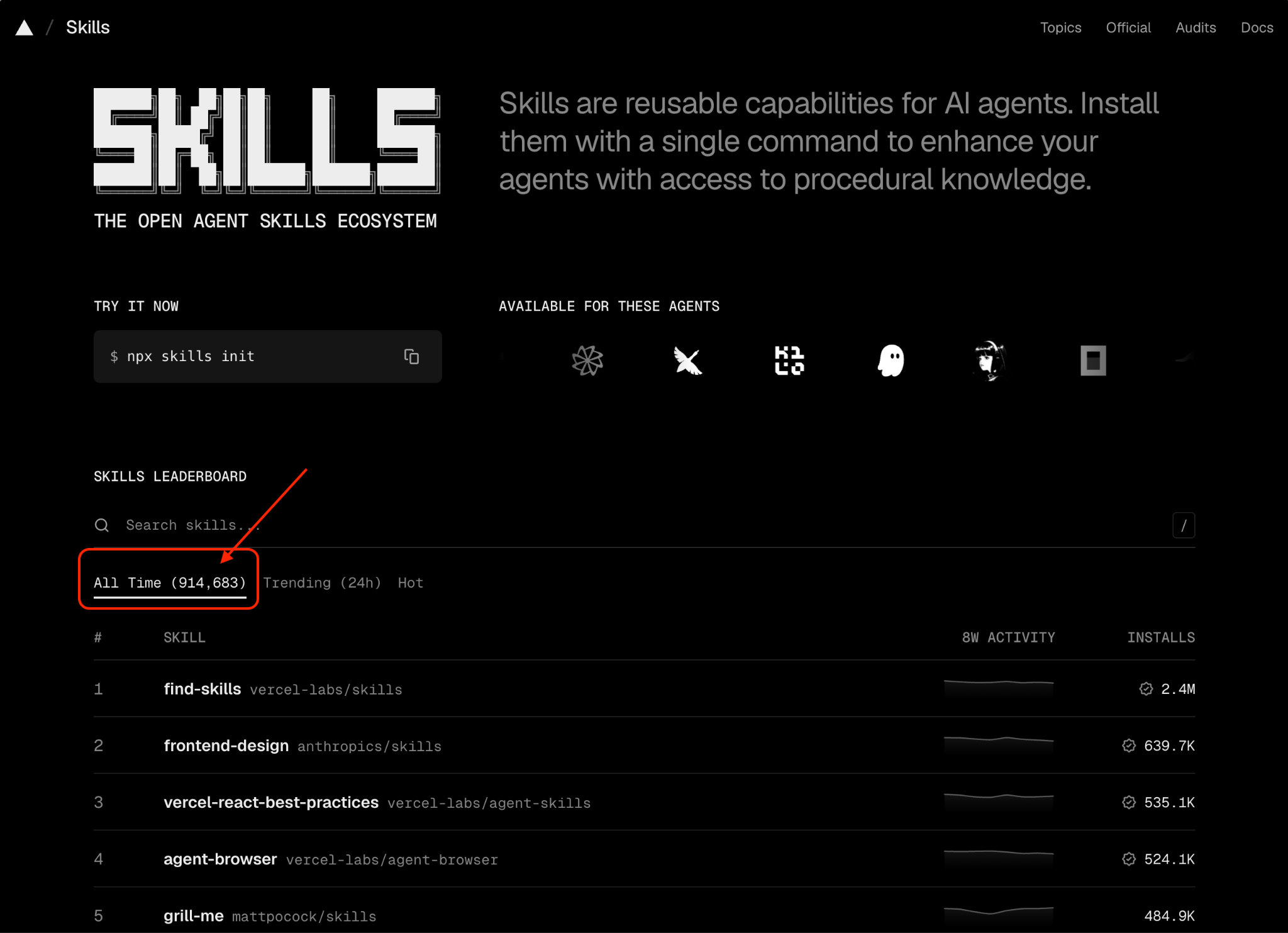
At the moment of taking this screenshot, as of July 2026, there are 914,683 skills out there for you to choose from on skills.sh.
But do you need that many?
I have more than 10 skills installed. Five loop commands and 4 custom commands. Several plugins. One agent (more to come). But even now, I sometimes stop and see what one of the loops does, or what a certain skill actually does.
I’d rather not turn into Dory from Finding Nemo, forgetting what I’m already holding.
Hoarding skills costs nothing up front, which is exactly why it’s so easy to keep doing. But nothing up front isn’t nothing. I’ve started using Claude Code pretty much as soon as it was released, and started using skills for a long time now. So I pulled the real numbers to see which ones were actually earning their place, and which ones were just sitting there.
The count told me what I use vs. what I don’t use. It also told me what to look for the next time I’m tempted to build one.
The count was supposed to settle which skills I could justify keeping. Instead it made me question what a skill is even for.
What an AI skill actually is
Think of something you are repetitively doing. That’s a perfect candidate for a skill, whether you’re building it in Claude Code or Codex.
In Claude Code, a skill is a folder with a “SKILL.md” file inside. It names a trigger. It lists the steps to run. It defines what good output looks like. Write it once, and Claude or GPT loads it whenever the task matches. There’s no need for re-explaining yourself. Codex packages the same idea differently, but the underlying logic doesn’t change: repeat the task once by hand, then never explain it again. Anthropic’s own docs cover the Claude Code mechanics; the difference between commands, skills, and agents covers when to reach for which.
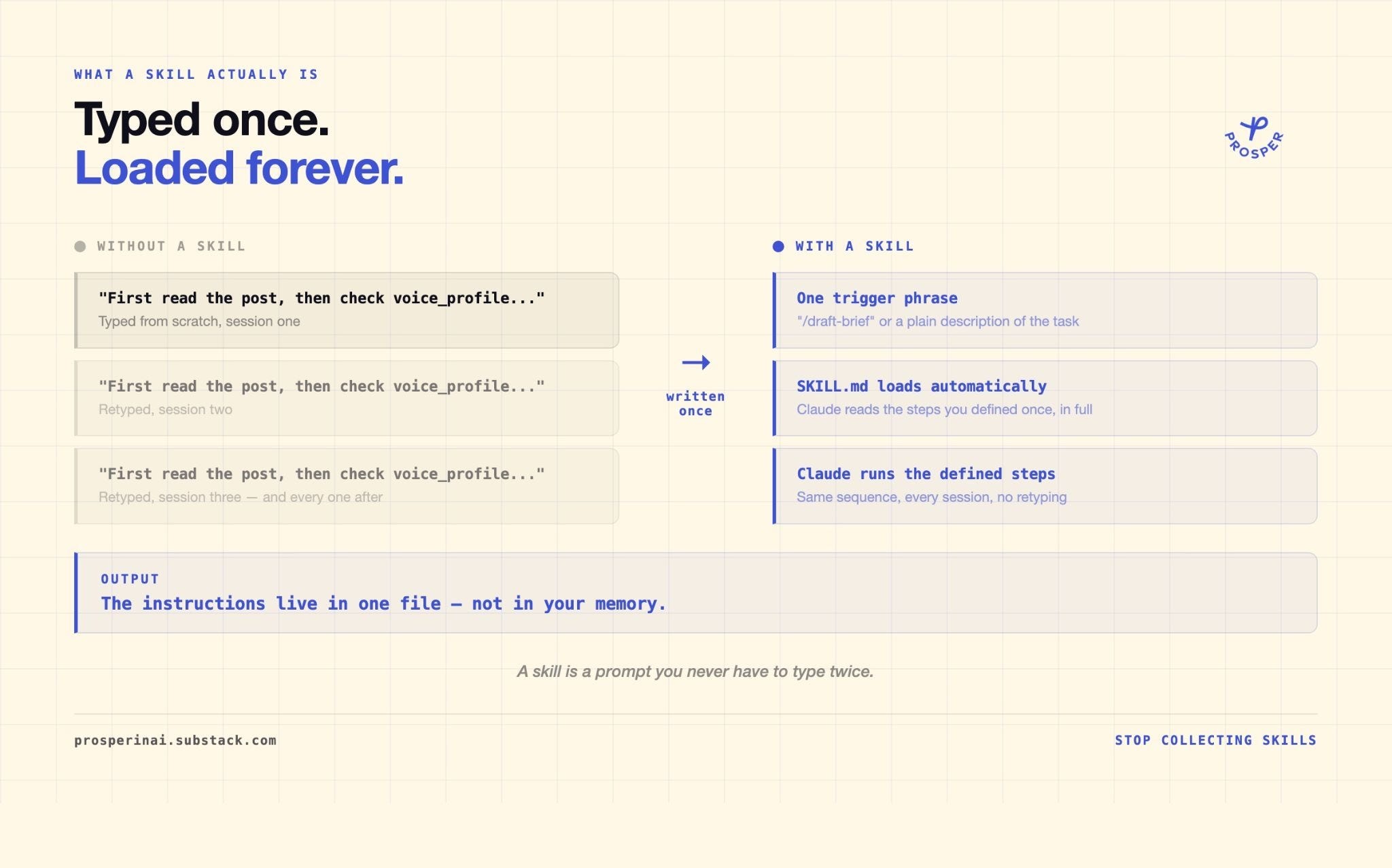
A skill is easy to define and easier to collect. The part that matters the most, though, if you will actually use it or not.
Why AI skill roundups don’t check usage
Every few weeks another AI newsletter runs the same post. Forty skills to automate your life. Twenty must-have prompts. Then the pivot: but these six actually matter. I’ve read a handful of these this month alone, and the pivot always shows up.
The number behind the pivot is rarely the right number. Star counts, download totals, how good the skill looked in a screenshot. What’s missing is how good the skill actually suits your workflow.
I checked my logs to see what skills I actually use.
What I found there was four numbers at the top, and a long tail of zeros underneath.
What my Claude Code usage history says
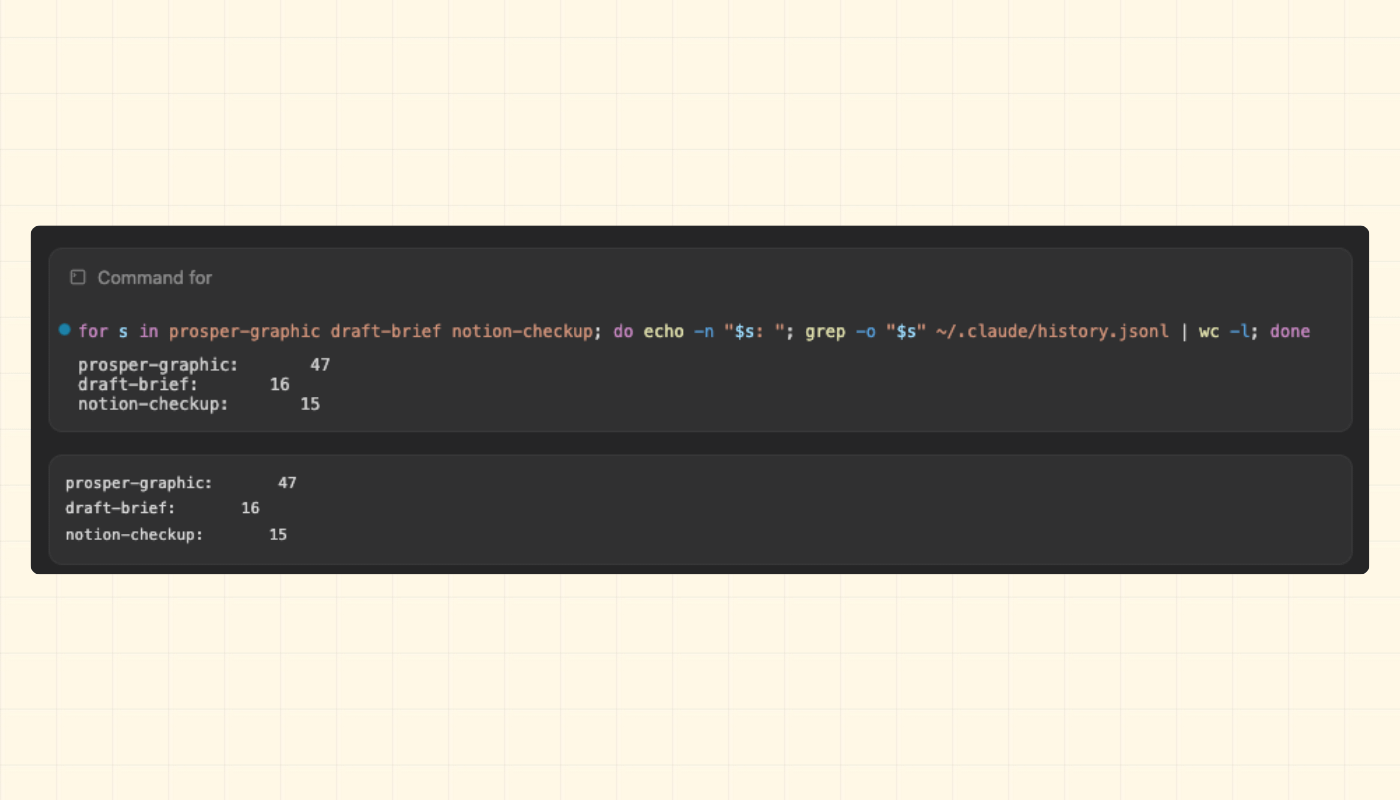
Claude Code logs every session to a local file on your machine. Same lesson I learned digging into [what actually lives underneath Claude Code and Cowork: both surfaces run on real files, and once you know where they live, you stop taking the UI’s word for anything. I searched mine for the name of every skill, command, and plugin I’ve installed, and counted how many times each one showed up.
Four numbers stood far above everything else.
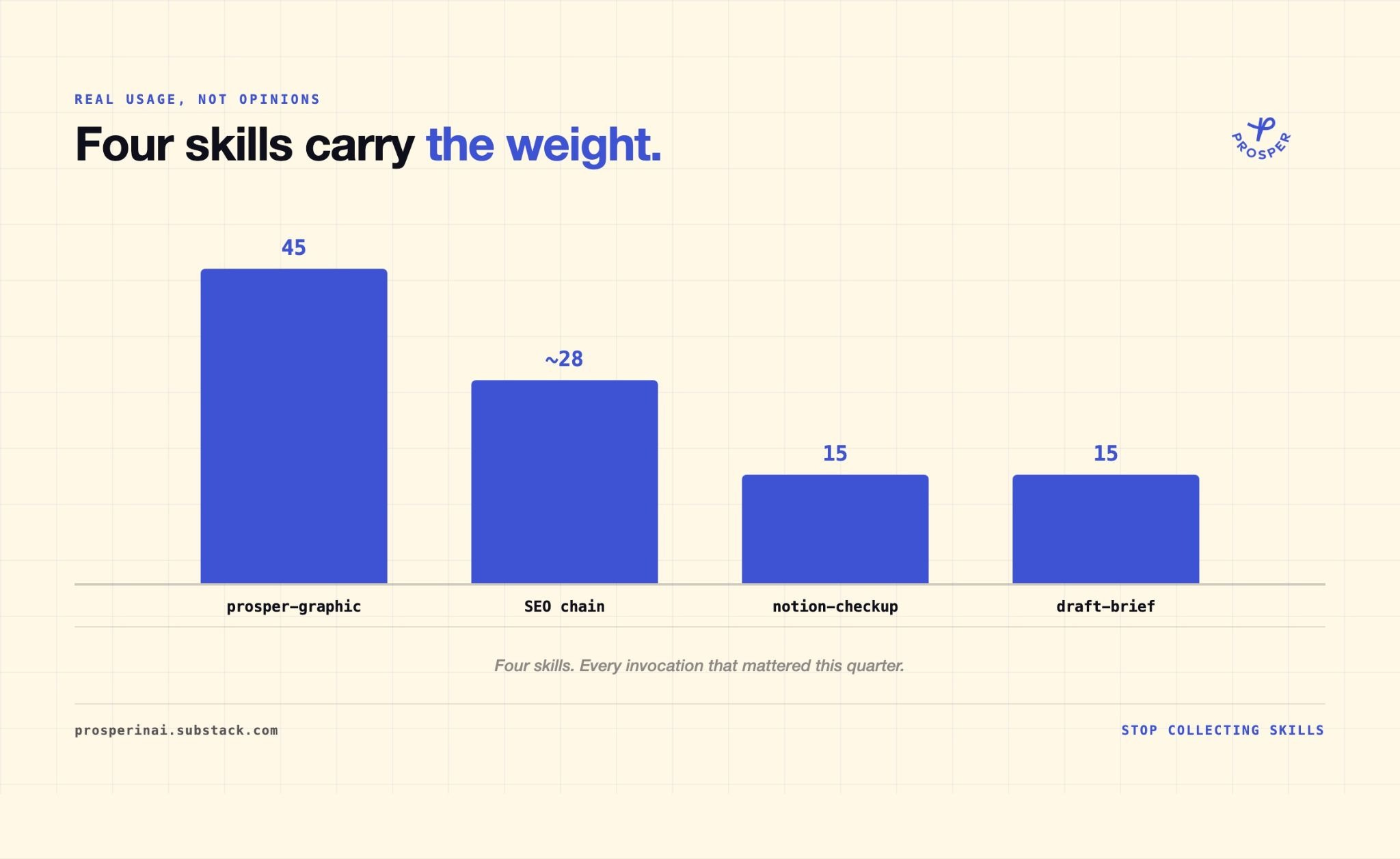
“prosper-graphic”, the graphic-generation skill I use throughout my posts, sits at 47 mentions. “draft-brief”, the interview I run before writing anything, sits at 16. “notion-checkup”, the skill that pulls my whole workspace status in one pass, sits at 15.
Then I have an SEO (Search Engine Optimization) agent. This one is a chain of five skills that check a post right before it goes live.
“seo-agent”
“seo-aeo-optimizer”
“seo-title-subtitle-analyzer”
“seo-loop”
“internal-links-loop”
Combined, they add up to 29.
And then, there are a bunch of skills that I either barely use or never used at all.
The count only tells you what’s real once you look at all of it side by side.
The four at the top aren’t random. Each one owns a job I’d have to do by hand without it.
The four Claude Code skills that map to a real job
All four of these skills map to something I HAVE TO DO every single week. None of them are the tools I’d have named first if you’d asked me a month ago.
“prosper-graphic” handles a production job. Every post needs graphics and illustrations every week. “draft-brief” handles an intake job. Nothing gets written until it runs, so it fires before every single post. “notion-checkup” handles a check-in job, reading four scattered sources and telling me what needs attention today. The SEO chain handles a publish-time job, the checks that run right before something goes live. Audit. Metadata. Internal links. Title testing.
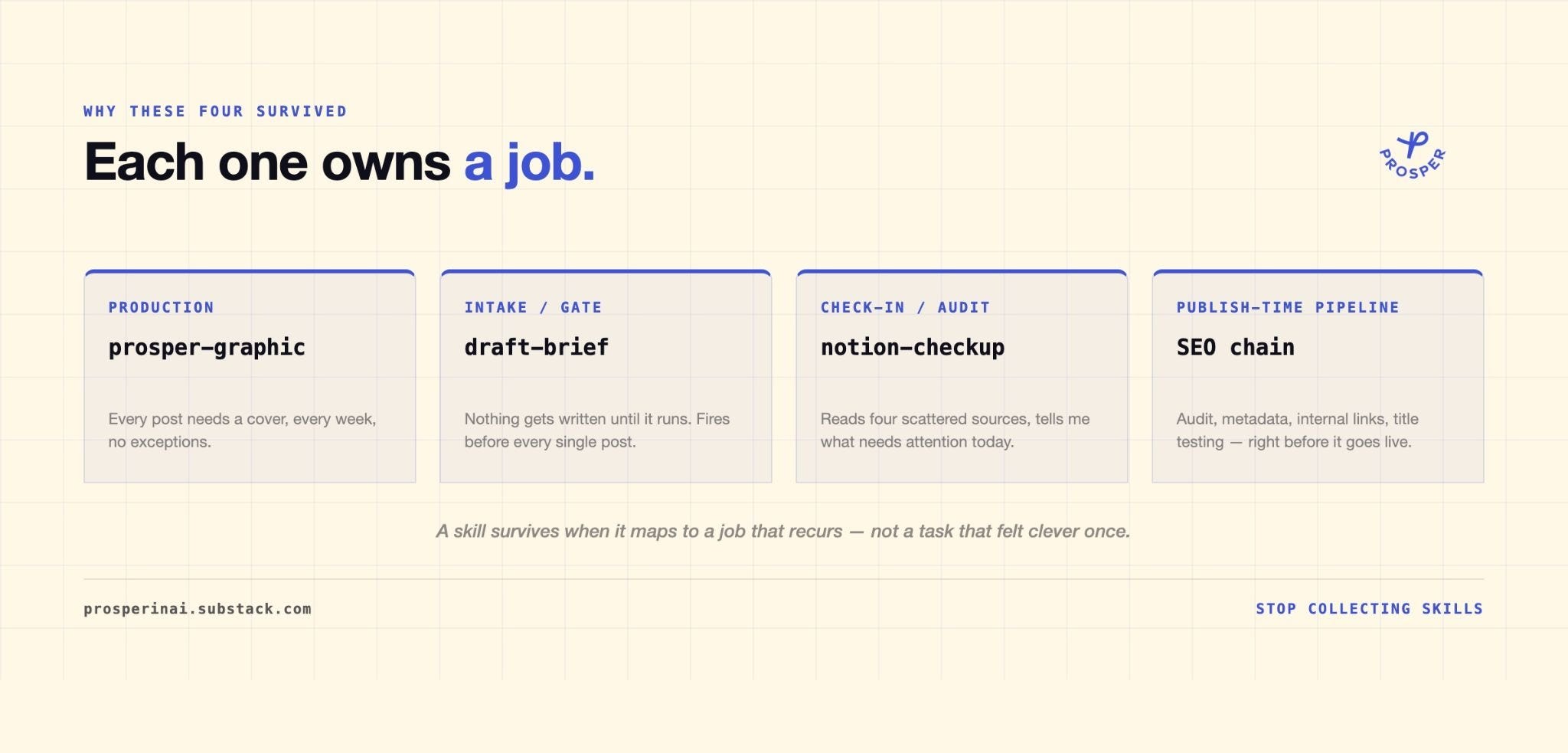
Four different jobs. Four different reasons to exist.
Everything sitting at zero fails this test the same way. I don’t even remember installing “swift-lsp.” “dataviz” and “artifact-design” came bundled with Claude Code itself. None of them map to work I repeat, but “artifact-design” will be useful for some future projects.
“Useful someday“ is exactly the instinct that filled my skills folder in the first place. There’s a real case for keeping skills you don’t use yet, and I want to take it seriously before telling you to delete anything.
Why some AI users collect skills on purpose
There’s a real argument against pruning this hard. A skill sitting unused doesn’t cost you anything. It doesn’t slow a session down. It sits there for the one week you need it. Collecting broadly is cheap insurance against unpredictable work, and pruning aggressively risks losing something you’ll want back next month.
Models are only getting stronger from here, and the four or five skills I actually run get better along with them, because I’m in there tightening the instructions every time one of them misfires or produces an output I don’t like. That upkeep is forced on me in a good way.
A skill sitting at zero never gets it. It was written for a framework that’s since changed, an API call that no longer works the way the instructions assume, or a single project that shipped once and never came back. You’ll trust it anyway, because it’s been sitting there looking ready. You haven’t opened it in months. It just sits there looking current.
There’s also a ceiling on this approach that we need to think about.
When the four-skill framework doesn’t apply
This only works if your work repeats. If your projects change week to week, you won’t have four stable jobs to map anything onto. Forcing this framework early hands you a false sense of order. Maybe there’s a overhauling framework that you apply to your projects and tasks that can be applied to multiple things, but it’s a bit harder to apply.
The count method has a blind spot of its own. Some of the most-used parts of a setup are entire features built into the product, and they won’t show up on a list like this at all.
I’ve written before about treating my own workflow as something worth measuring instead of guessing at, in here:
How I Built 5 Loops Into My Newsletter Workflow

Two weeks ago, Boris Cherny, the person who leads Claude Code at Anthropic, said this at a WorkOS keynote:
The same instinct applies here. Trust the count over the impression.
The only way to trust the count is to run it on your own setup.
How to audit your own Claude Code skills
I didn’t expect this audit to be this clarifying for me personally. It’s just good to check your own patterns and see what’s actually happening. I believe it will improve the quality of your work.
I assumed I’d find more skills worth keeping. Instead the real number was smaller than I thought, and those four that I use the most weren’t the ones I would have guessed sitting down to write this.
Pull your own numbers, you’ll be amazed. Run this once for every skill in your “~/.claude/skills” folder:
grep -o “skill-name” ~/.claude/history.jsonl | wc -lWhatever survives the count is YOUR real four. Analyze your skills and see which ones are worth modifying, combining, deleting, or moving to a different location.
Then apply the same filter going forward, before you build or install the next one. Don’t ask whether a skill sounds useful. Ask whether it maps to a job you already do on repeat.
A junkyard doesn’t fill up with useless cars on purpose. Each one got towed in because someone thought it might come in handy, or it ran fine for one season and then never moved again. Your skills folder can fill up the same way. If you can’t name the job, you’re parking another car you’ll be paying to store for the next six months.
What’s the one skill in your setup you’d bet is sitting at zero?
Reply, I am curious! I’ll run my own count again in a few months and see if it moves.
Thank you so much for reading,
Ilia