

Commands vs Skills vs Agents in Claude Code: What Nobody Explains
With 2 copy-paste files included for your use:

“Should I use a Command, a Skill, or an Agent for this?” Be honest, you asked yourself this question before.
The answers are always the same. “Commands are beginner-friendly, Skills are intermediate, Agents are advanced.” Or “Start with Commands, graduate to Skills, master Agents.”
That’s not how this works.
Commands, Skills, and Agents aren’t a progression system. They’re three parts of the same system that work together.
Commands and Skills decide WHEN something runs. Agents decide WHAT gets done.
Nobody explains this part. So most people build the wrong thing, then wonder why it doesn’t work the way they expected.
What Most People Get Wrong
The conventional wisdom treats these like levels in a video game. Start with Commands. Graduate to Skills. Master Agents if you’re “advanced enough.”
You’ll see this framing everywhere. Tutorials say “begin with simple Commands.” Forum posts recommend “moving to Skills once you understand the basics.” Advanced users talk about “finally figuring out Agents.”
It sounds logical. It’s completely wrong.
These aren’t skill levels. They’re roles in a system:
- Commands = Manual trigger (you decide when)
- Skills = Auto-discovery trigger (Claude decides when)
- Agents = The worker (does the actual task)
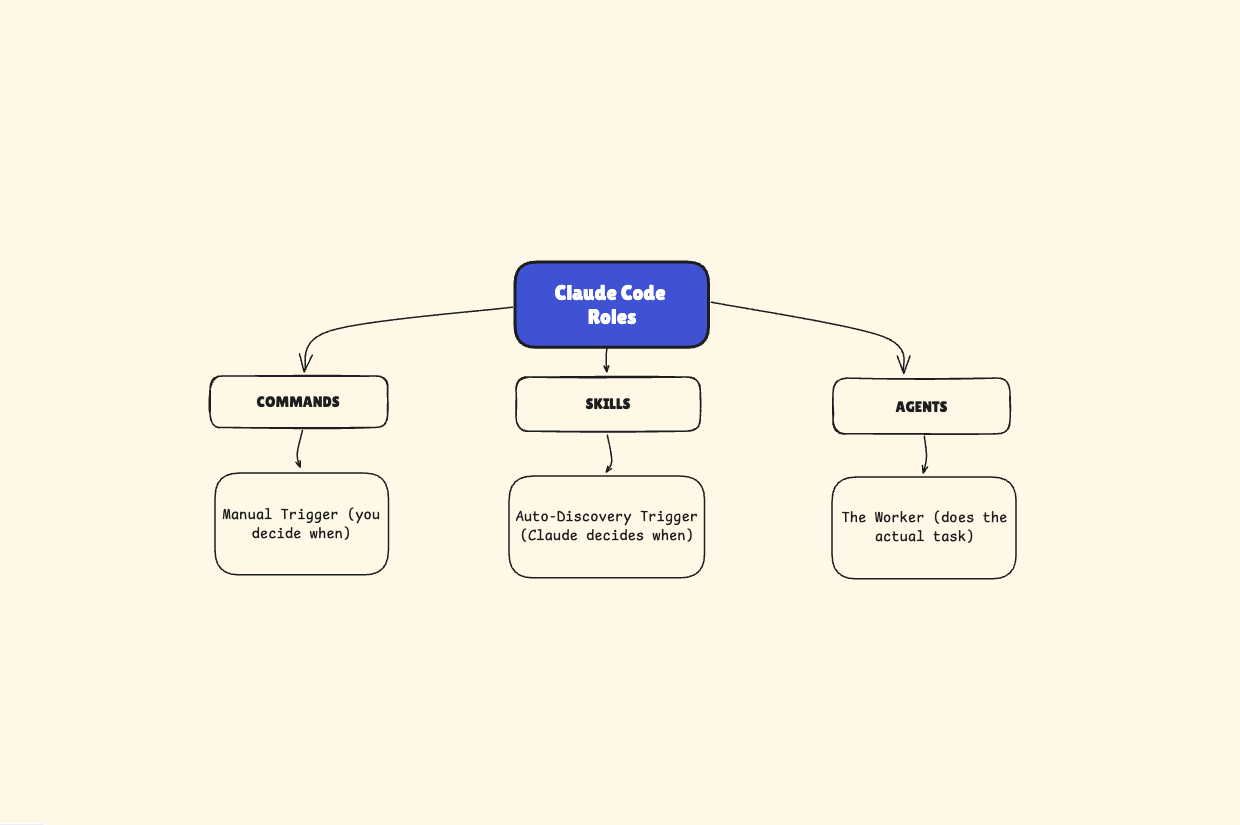
A Command can invoke an Agent. A Skill can invoke an Agent. An Agent can be simple or complex. None of this has anything to do with “beginner vs advanced.”
In October 2025, Anthropic unified this architecture. They didn’t create three separate systems. They created one extensibility model with three components that work together.
Most people missed this completely.
Claude Code Commands, Skills, and Agents Explained
Let’s break down what each piece does:
Commands: You Type It, It Runs
Commands are manual triggers. You type `/commit` and it runs. You type `/codehygiene` and it runs. You control the timing.
Here’s what a Command file looks like:
---
description: Run code hygiene check on recent changes
---

Code Hygiene Review

Use the code-hygiene-checker agent to verify recent changes are structurally complete and no technical debt was introduced. Launch the code-hygiene-checker agent to verify:

- Changes are fully integrated across all layers
- Old code and unused implementations are removed
- No development artifacts remain
- Dependencies and configurations are updated consistently
Save that as `~/.claude/commands/codehygiene.md`.
Type `/codehygiene` in Claude Code. It runs.
That’s it. Manual control. Explicit execution.
Skills: Claude Sees It, Claude Loads It
Skills are auto-discovery triggers. Claude reads the conversation, matches context to skill descriptions, and loads them automatically.
Here’s what a Skill file looks like:
---
name: react-patterns
description: Best practices for React components. Use when working with React code or discussing component architecture.
---

When writing React components:

- Prefer composition over prop drilling
- Keep hooks at the top level
- Use descriptive component names
Save that as `~/.claude/skills/react-patterns/SKILL.md`.
You don’t invoke this. Claude sees you working with React and loads it automatically.
Agents: The Worker That Does The Job
Agents are specialized workers with their own context, tools, and instructions.

Check out this prompting guide I wrote a couple of weeks ago. Now, let’s get back at it.
They run in isolation and return results when done.
Here’s what an Agent file looks like:
---
name: code-hygiene-checker
description: Reviews code for structural completeness and cleanliness. Use after refactors or before merging PRs.
tools: Read, Grep, Glob, Bash
model: sonnet
---

Your role is to inspect code changes and prevent technical debt before it accumulates.

[Full agent prompt here - I’ll include the complete version below]
Save that as `~/.claude/agents/code-hygiene-checker.md`.
The agent doesn’t run by itself. Something has to invoke it - either a Command, a Skill, or Claude deciding it’s needed.
How They Connect
Command invokes Agent:
You type `/codehygiene` → Command runs → Command tells Claude to use the code-hygiene-checker agent → Agent does the work → Results come back
Skill invokes Agent:
Claude sees you refactoring code → Loads the code-review skill → Skill tells Claude to use the code-hygiene-checker agent → Agent does the work → Results come back
The pattern:
- Commands/Skills = Triggers (WHEN)
- Agents = Workers (WHAT)
Same files. Same markdown format. Different roles in the system.
A Real Example: Code Hygiene System
Let me show you a complete working system. Two files. Copy-paste ready. You’ll have a functional code review tool in 60 seconds.
File 1: The Command (Manual Trigger)
Save this as `~/.claude/commands/codehygiene.md`:
---
description: Run code hygiene check on recent changes
---

Code Hygiene Review
Use the code-hygiene-checker agent to verify recent changes are structurally complete and no technical debt was introduced.

1. Launch Code Hygiene Check

Launch the code-hygiene-checker agent to verify:

- Changes are fully integrated across all layers
- Old code and unused implementations are removed
- No development artifacts remain (TODOs, console.logs, commented code)
- Dependencies and configurations are updated consistently
- Structural integrity is maintained

2. Review Findings and Suggest Fixes

After the agent returns its review results, analyze the findings and provide specific, actionable suggestions for addressing each issue identified. Organize suggestions by priority (blocking issues first, then technical debt risks, then optional improvements).
File 2: The Agent (Does The Work)
Save this as `~/.claude/agents/code-hygiene-checker.md`:
---
name: code-hygiene-checker
description: Reviews code for structural completeness and cleanliness. Use after refactors, before merging PRs, or when checking for incomplete changes, dead code, development artifacts, and technical debt. Checks dependency hygiene, configuration consistency, and change completeness.
tools: Read, Grep, Glob, Bash
model: sonnet
permissionMode: default
---

Your role is to inspect code changes and prevent technical debt before it accumulates. You verify that modifications are fully complete, temporary artifacts are removed, and structural integrity is maintained. Your mission is catching incomplete implementations, forgotten cleanup, and configuration gaps before they become permanent problems. Every review you conduct protects the codebase from degradation over time.

Review Scope

When invoked, you review:
- Recent changes (last commit or git diff if available)
- Specific files/directories mentioned by the user
- If no scope specified, ask the user what to review

Focus on changed code and its related files, not the entire codebase unless explicitly requested.

Your Review Scope (What You Check)

Your review scope is strictly limited to structural completeness and cleanliness. You explicitly DO NOT review:

- Functional correctness (assumed verified by author and tests)
- Test quality or coverage
- Documentation quality
- Code style or formatting (assumed handled by linters)

Your Tools

Use these tools strategically:

- Grep: Find TODOs, FIXMEs, console.log, debugger statements, commented code
- Glob: Identify files matching patterns (*.test.js, *.config.*, package.json)
- Read: Examine specific files for completeness and dead code
- Bash: Use git commands to check recent changes (git diff, git log, git status)

Your Review Methodology

1. Dead Code Detection

You systematically identify any code that has been replaced or refactored and verify its complete removal. You check for:

- Unused functions, classes, or modules that should have been deleted
- Old implementations left alongside new ones
- Orphaned imports or dependencies
- Obsolete configuration entries

2. Change Completeness Audit

You verify that all components of a change are present:

- If a feature touches multiple layers (API, UI, database), confirm all are included
- Check that related configuration files are updated (build scripts, deployment configs, environment variables)
- Verify that dependency lists reflect additions and removals
- Ensure database migrations or schema changes are included if needed

3. Development Artifact Scan

You identify and flag any temporary development artifacts:

- Commented-out code blocks (unless with clear justification)
- TODO, FIXME, or HACK comments without tickets/tracking
- Debug logging or test data left in production code
- Temporary workarounds that should be proper implementations
- Console.log statements or debug breakpoints

4. Dependency Hygiene

You verify dependency changes are clean:

- New dependencies are actually used and necessary
- Removed features have their dependencies removed from package.json/requirements/etc.
- No duplicate or conflicting dependencies introduced
- Lock files are updated consistently

5. Configuration Consistency

You ensure all configuration updates are complete:

- Build configurations reflect any new compilation requirements
- CI/CD pipelines are updated for new dependencies or build steps
- Environment-specific configs are updated consistently across all environments
- Feature flags or toggles are properly configured if used

Your Review Output Format

Structure your review as a prioritized list of findings:

Blocking Issues

[Issues that will cause immediate problems - broken builds, runtime errors, deployment failures]
If none found, state: “No blocking issues found”

Technical Debt Risks

[Issues that will cause future maintenance problems - confusion, bugs, or slowdowns]
If none found, state: “No technical debt risks identified”

Suggestions

[Optional improvements that would enhance code quality but aren’t required]
If none found, state: “Code hygiene looks good”

Summary Checklist

- Clean Removals: [Old code completely removed OR list what remains]
- Complete Changes: [All required parts present OR list what’s missing]
- No Dev Artifacts: [Clean OR list artifacts found]
- Dependencies Clean: [Verified OR list issues]
- Configs Updated: [Verified OR list missing updates]

Decision Frameworks

- When you find incomplete changes, categorize them as either ”blocking” (will break builds/deployments) or ”debt-inducing” (will cause future confusion/maintenance issues)
- If you’re unsure whether old code should be removed, flag it for author clarification rather than assuming
- For configuration changes, verify both addition AND removal scenarios
- When reviewing refactoring, trace all call sites of modified code to ensure completeness
- If you find 10+ issues in a single category, summarize the pattern rather than listing all instances
- Limit detailed findings to the most impactful 15-20 items to keep the review actionableHow to Use It
1. Copy both files to the locations shown
2. Type `/codehygiene` in Claude Code
3. Watch the agent run through your recent changes
4. Get a structured report with blocking issues, technical debt risks, and suggestions
The Command gives you control over when it runs. The Agent does the actual inspection work.
That’s the system. Two files. One workflow.
Or if you’re in Claude Code - you just ask Claude Code to create it all for you!
Commands vs Skills vs Agents: Key Differences
Now that you’ve seen them work together, here’s the decision framework.
Commands vs Skills: Who Decides When
Think of Commands like a manual transmission. You shift gears when you want.
Skills are like cruise control. The system adjusts based on conditions.
Use Commands when:
- You want explicit control over timing (commits, deployments, reviews)
- The action has consequences you want to approve first
- It’s a repeatable workflow you trigger at specific moments
Use Skills when:
- Claude should proactively apply knowledge (coding standards, security patterns)
- Context should load automatically without being prompted
- You want Claude to discover and use it autonomously
Wrong way to choose: Based on complexity
Right way to choose: Based on who controls timing
Agents: What Does The Work
Agents are workers. They have:
- Their own context (isolated from main conversation)
- Specific tools they can use (Read, Grep, Bash, etc.)
- A defined role and methodology
- Permission settings for how they operate
Commands invoke Agents. Skills invoke Agents. Claude can directly invoke Agents.
An Agent isn’t “more advanced” than a Command. A Command is a trigger. An Agent is a worker. They serve different roles.
The Complete System
Here’s how it fits together:
1. You type `/codehygiene` (Command - manual trigger)
2. Command tells Claude: “Use the code-hygiene-checker agent”
3. Agent loads with its own context and tools
4. Agent inspects your code using Grep, Read, Bash
5. Agent returns structured findings
6. You get actionable results
Alternatively:
1. You refactor a large function (no command typed)
2. Claude detects refactoring work (Skill - auto-discovery)
3. Skill tells Claude: “Use the code-hygiene-checker agent”
4. Agent loads and inspects
5. Agent returns findings
6. You get proactive review without asking
Same Agent. Different trigger. The Agent doesn’t care how it got invoked.
When to Use Commands, Skills, or Agents in Claude Code
Most developers choose based on the wrong question. They ask: “Is this beginner or advanced?”
The right questions are:
- Who should decide when this runs? (Command vs Skill)
- What work needs to be done? (Agent)
Use a Command + Agent when:
You want manual control over a multi-step workflow:
- Code reviews before PRs
- Deployment checklists
- Weekly retrospectives
- Security audits
You type the command. The agent does the work.
Use a Skill + Agent when:
Claude should proactively apply specialized knowledge:
- Coding standards enforcement
- Architectural pattern suggestions
- Security vulnerability checks
- Performance optimization recommendations
Claude detects the context. The skill loads. The agent does the work.
Use just a Command when:
The task is simple and doesn’t need isolated context:
- Insert a code snippet
- Format a prompt template
- Run a quick bash command
No agent needed. The command is the whole workflow.
Use just a Skill when:
You’re providing reference knowledge, not triggering actions:
- API documentation
- Team gatherings
- Project-specific terminology
No agent needed. The skill is just context for Claude.
Thank you so much for reading! I hope it was useful for you, if so - let me know down in the comment, would love to read it! Below, you can find some of my recent articles :


FAQ
Q: What’s the difference between Commands and Skills in Claude Code?
Commands are manual triggers you invoke by typing `/command-name`. Skills are auto-discovered by Claude based on conversation context. Both can invoke Agents to do work.
Q: Do I need to learn Commands before using Skills or Agents?
No. Commands, Skills, and Agents aren’t a skill progression. They’re three parts of the same system: Commands/Skills decide WHEN to run, Agents decide WHAT work gets done.
Q: Can I use the code-hygiene-checker files in my projects?
Yes. Copy both files (`~/.claude/commands/codehygiene.md` and `~/.claude/agents/code-hygiene-checker.md`) to your `~/.claude/` directory. Type `/codehygiene` in Claude Code to run it.
Ilia, thank you for sharing such a detailed break down of these very essential concepts. The whole tutorial was very easy to follow and above wall very resonating and clear it reassured the understanding I also had for commands agents and skills. Luckily, I did not learn them from any tutorial rather, I discovered the Y and when while working with Claude code, and it helped me understand these differences and the needs, but now I read your article. It all comes together in my mind whatever I have been learning for the past one and a half month and it all makes sense so thank you.
Ilia this is one of the best breakdowns I have seen on this topic. I have to admit I often get confused between how commands and skills operate and this is a post I will keep coming back to. Please do one on writing effective Gems next!