

How To Prompt Like An Anthropic Engineer
17 tactics from the people who build Claude: the exact setup, the SKILL.md skeleton, and 4 prompts to audit your own.

I watched a string of talks from Anthropic’s Code with Claude event in San Francisco in May 2026: Boris Cherny, Barry Zhang, Thariq, Alex Albert, and the people who build Claude Code and with Claude Code. I also watched a couple of other videos from Anthropic’s engineers. I went in expecting magic phrases and some corporate talk.
But what I saw was people who build Claude and who build with Claude just sharing their tactics and ways to utilize Claude in the best ways possible.
They talk about folders, and scripts they save and reuse. Skills that chain together. How Claude behaves. Documentation that absorbs every mistake so it never happens twice. And a ton of other things.
For some people out there, the prompt is still the whole game. The Anthropic engineers don’t work that way. That means that we can’t operate like that anymore either. Anthropic build an infrastructure for YOU to build on top of. At this point, The prompt is actually the smallest part of what they do.
They design systems that produce correct implementations, so they don’t have to keep implementing things by hand.
I learned this the hard way, on my own SEO setup.
For months my entire SEO process sat in one file I called “seo_aeo_optimizer.md”. One giant prompt (around 500-600 lines at that point). Keyword research, on-page audit, metadata, internal linking, title scoring, all stuffed into a single document I’d paste into Claude.
I thought it worked. But really, Claude missed a bunch of things here and there. I mean, there are 600 lines of things that I wanted Claude to do.
About 2 weeks ago I split it.
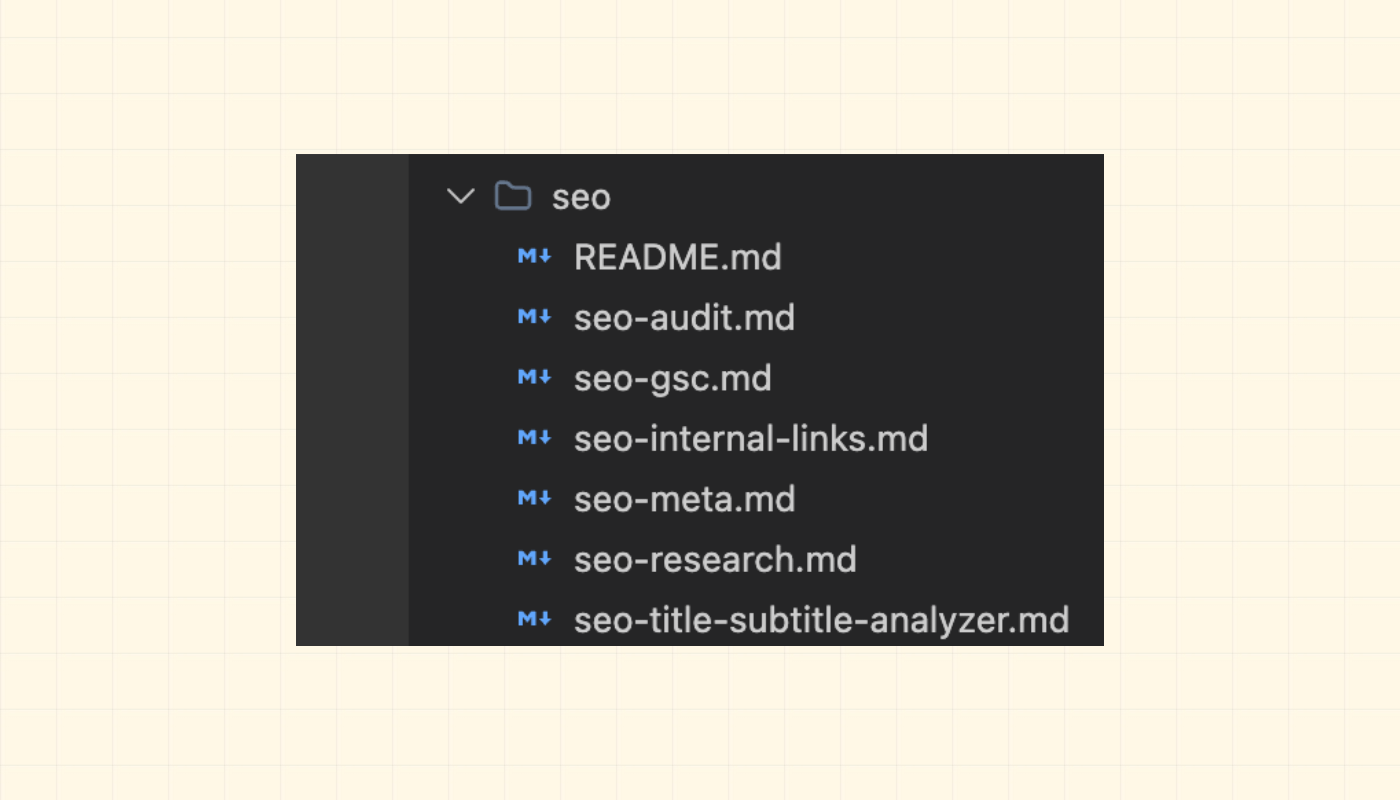
6 focused files: research, audit, metadata, internal links, GSC monitoring, title scoring. Each one does a single job. I can improve each one on its own. I wired them together with slash commands and a seo-agent that runs them in sequence. Then, I also updated my CLAUDE.md so Claude knows which file to reach for and when.
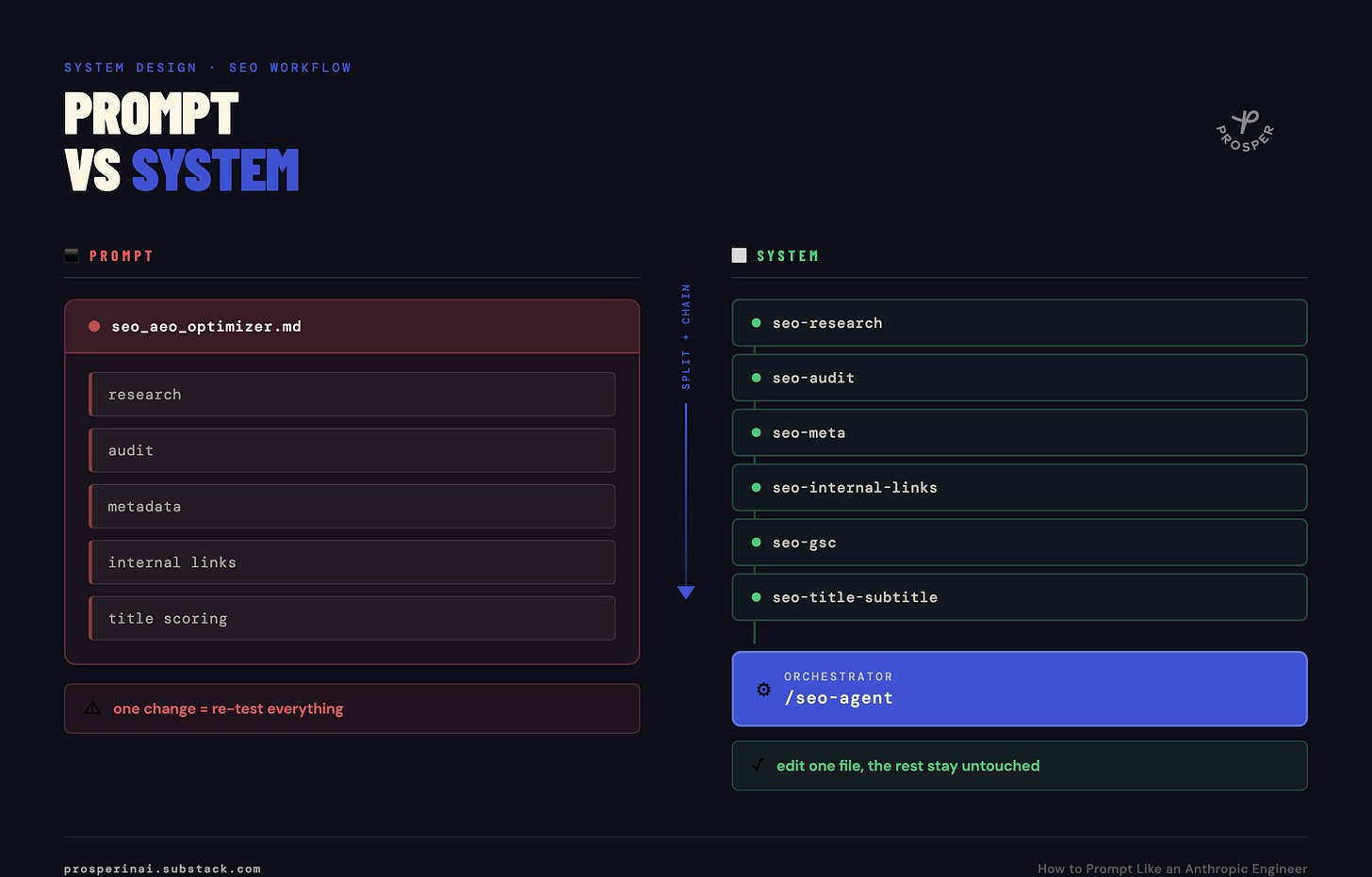
Now when I want to improve title scoring, I open one file, edit it, and test that one thing. Every workflow that uses it gets the upgrade as well, and I don’t have to look into the other five.
When I watched those Code with Claude videos from the people who built it and use it, I am realizing that my thinking about how I work needs to change and my workflows needs to be updated too.
So here’s what I want you to do with this article. Use it to rebuild one workflow this week. Start simple, but you will definitely see the benefit because the changes that you make now will benefit you when new models will be released.
I’d also venture to say that most of the tips I will share below are model agnostic, so can be applied with most models!
Prompting is system design now
Here’s where I am changing my thinking:
Like Apple built the iPhone, mobile developers build the apps. Same with Anthropic.
The model is theirs. The runtime is theirs. What you own, the part where your advantage compounds, is the layer on top of all of it: the skills, the agents, the documentation, the tools, the chained workflows. That layer is yours, and it’s the only place your time accumulates into something.
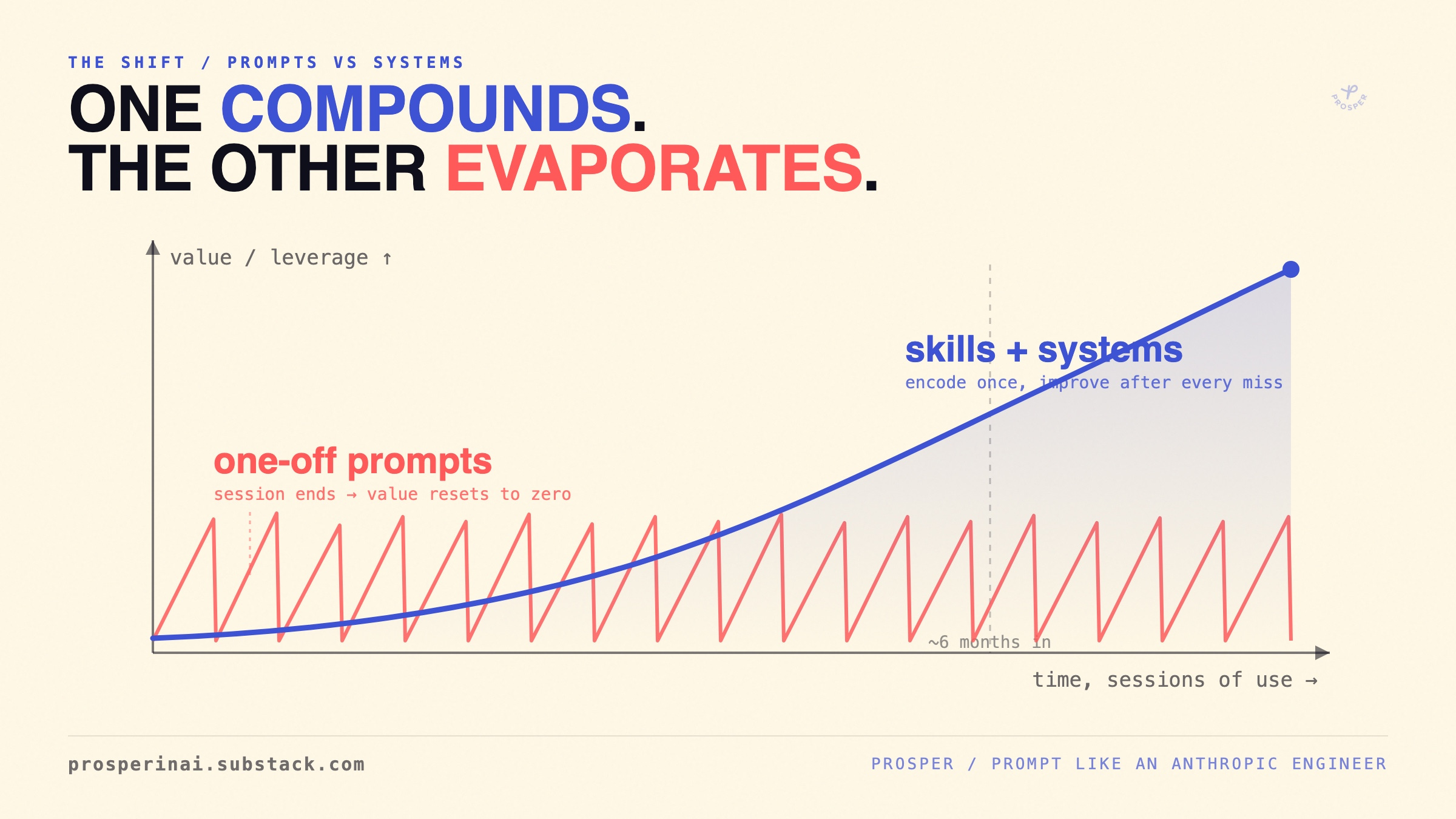
When you write a one-off prompt, you get a one-off result. When the session ends, the value is gone. You start the next task from scratch.
When you build a skill, you encode the procedure once. Claude runs it the same way every time. You improve it after each miss. Six months in, it’s doing work your day-one self couldn’t have specified. Totally different approach.
Everything below is how the Anthropic engineers build the part that compounds. I’ve grouped the moves into 6 layers, ranked roughly by how much they changed how I work, then handed you two templates at the end. One warning up front: some of the advice from Anthropic assumes Anthropic’s compute budget. And for Anthropic’s engineers, it’s probably unlimited (unfortunate for us). I’ve marked where it breaks on a Pro plan and what to do instead.
By the end of this post, you’ll have:
- 17 tactics from the engineers who build and use Claude daily, grouped into 6 layers
- A SKILL.md skeleton you can copy and fill in for any workflow you want to systematize
- 4 discovery prompts that audit your setup and tell Claude exactly what to build next
- A clear line between where to spend tokens and where to cap them on any plan
Let’s go.
P.S. If this post is useful, share it. I’m aiming for 100 shares on this one. Sharing costs nothing and helps more people find Prosper, which is the whole point.
Layer 1: Build skills instead of prompts
This might be the most important layer here.
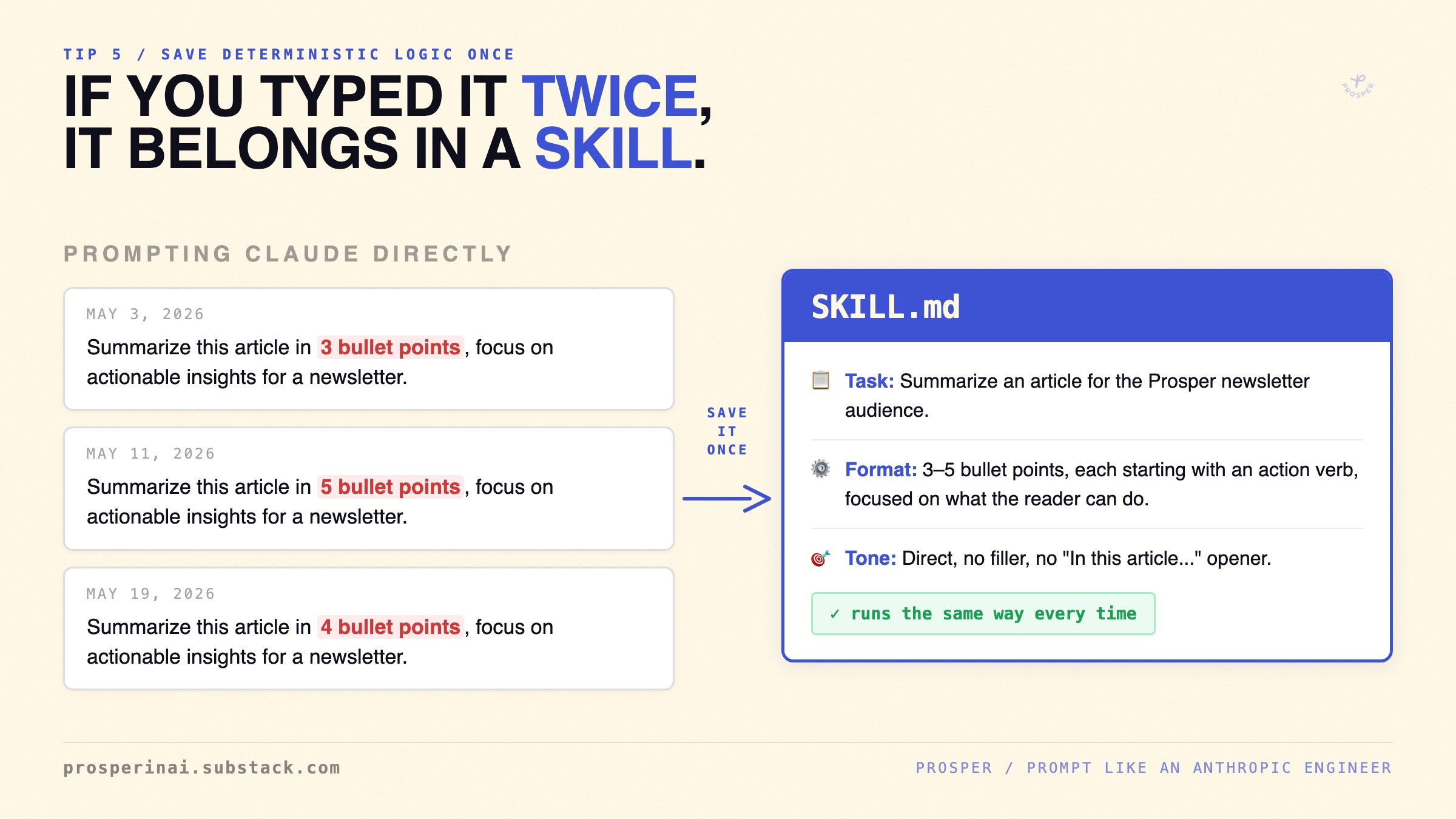
Prompt skills, not Claude. If you’re typing the same kind of instruction twice, that’s a skill you need to build. Anthropic engineers don’t write a custom prompt for every task. They build skills and invoke them with a slash command, so the task runs the same way every single time.
If the line between commands, skills, and agents is still fuzzy, I broke down the difference here:

A skill is a folder. Barry Zhang’s words: “They’re folders. This simplicity is deliberate. Skills are the ogranized folders with scripts as tools” Inside it, a “SKILL.md” file with instructions, plus any scripts and references Claude needs. That’s it. Don’t overthink the container.
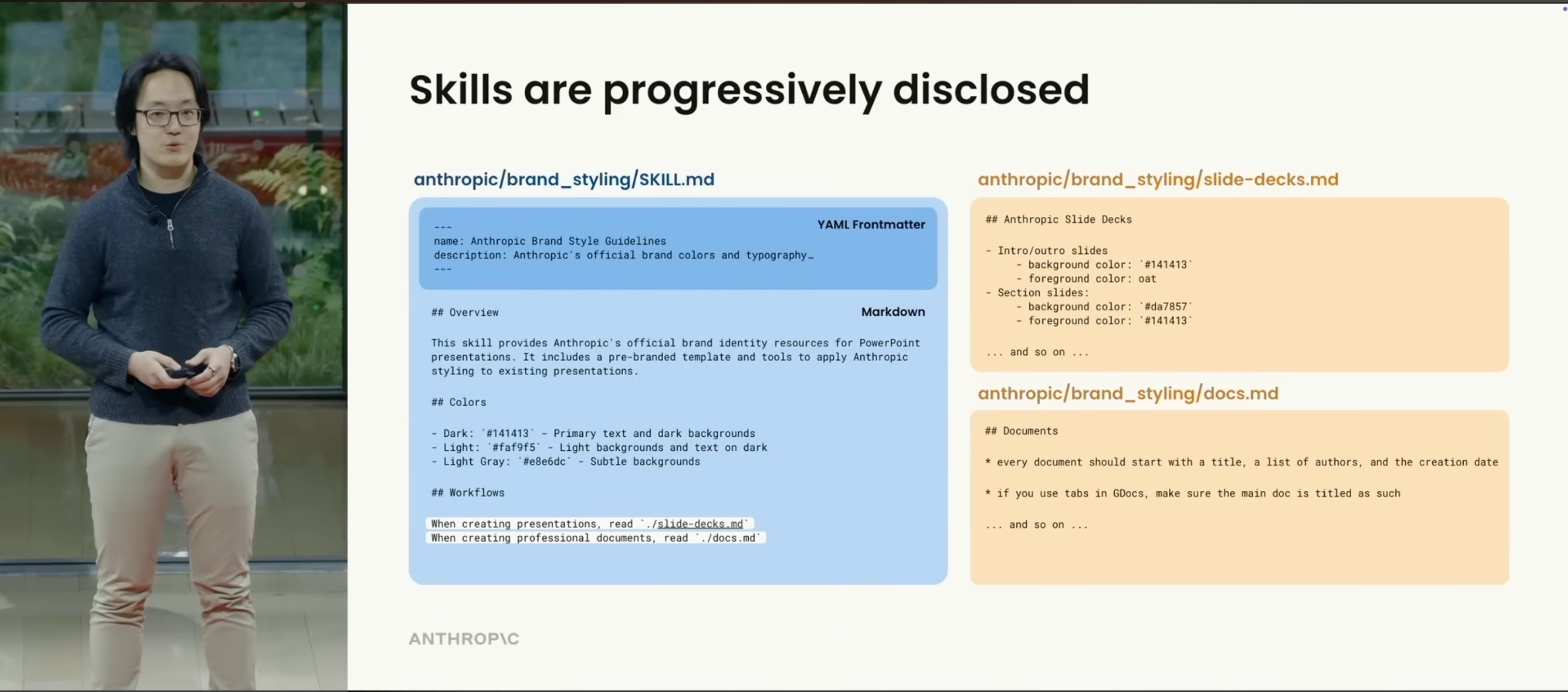
Anthropic builds the infrastructure, you build on top of it. The model improves on Anthropic’s schedule so one of the few way you can take advantage of it is to build the skills layer on top: that’s where your specific knowledge, your process, and your context sit. Super important.
Layer 2: Make skills composable
Small focused skills beat one giant skill and not everything needs to be reusable. This is the lesson from my SEO split. This is where I am starting to re-think so of my workflows as well. If you got one gigantic skill (500-600 lines of info) - break it into focused skills. Because bugs are easier to locate, improvements compound across every workflow that calls the skill, and you reuse instead of rebuild. But for a true one-off task, build a throwaway tool, use it, and delete it. That’s what Anthropic’s engineers also recommend.
Save deterministic logic as scripts inside skills. If Claude writes the same Python script twice, save it in the skill as a tool for next time. Code is deterministic: same input, same output, no tokens burned. The rule: if you can use code instead of AI, use code.
Layer 3: Make the system get smarter every session
On this layer, you need to think about how to make the system get smarter every session. And there are a couple of ways you can do it.
