

Opus 4.6 Dropped. The Benchmarks Are the Least Interesting Part
Most people will get 20% of this release’s value. The other 80% is in features everyone’s ignoring.

A new model drops. The web explodes. Most people will read the benchmarks, nod, update their API calls, and move on. The missed 80% of other announcements, but not me, and I want you to know about them too.
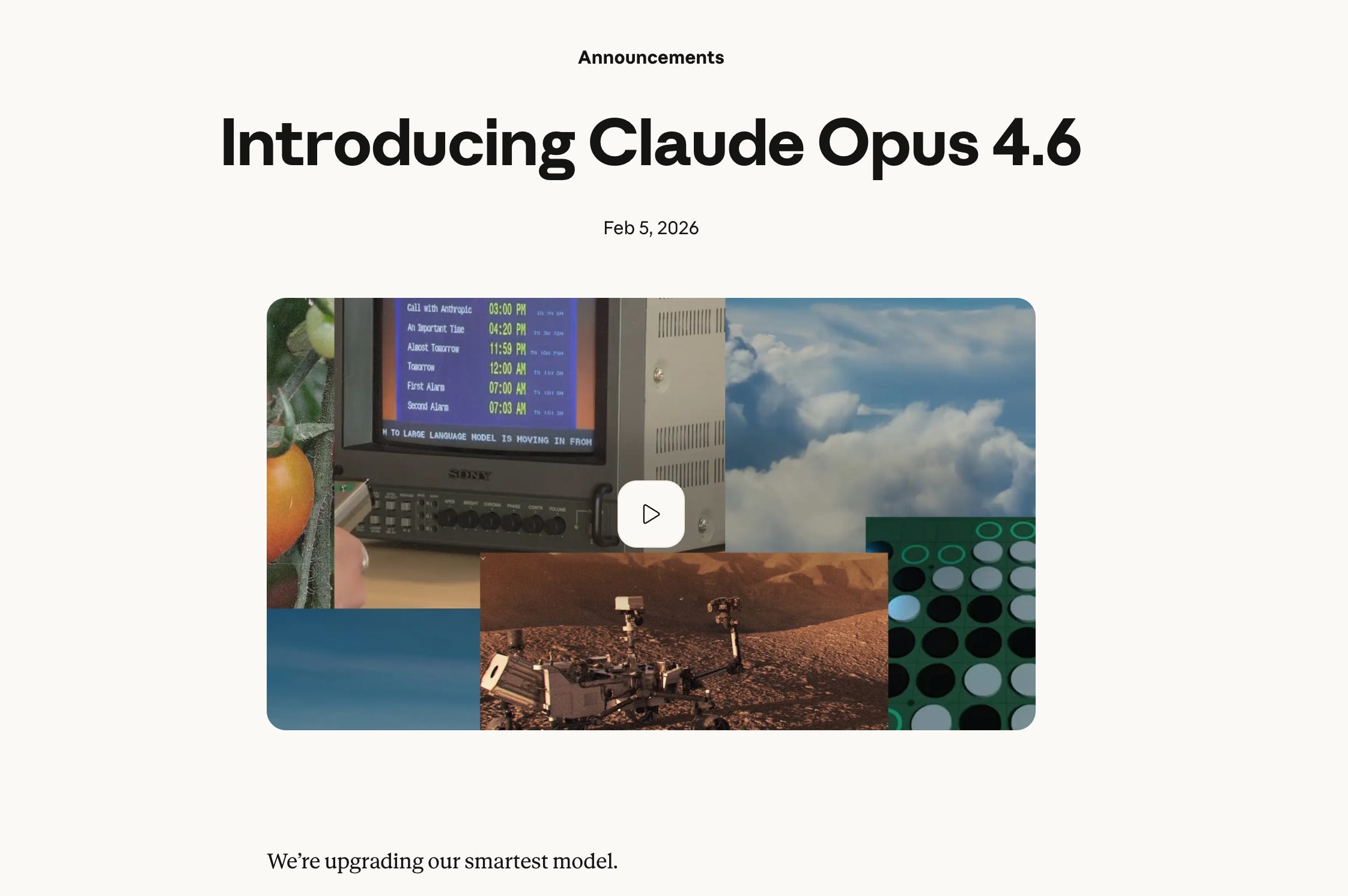
Because the benchmarks are just the headline. It’s not easy for users to understand either. The real story is what Anthropic shipped alongside the model in Claude Code. Effort controls that let you dial how hard Claude thinks. Agent Teams that split work across multiple Claude instances. A `/insights` command that analyzes 30 days of your coding sessions and tells you what you’re doing wrong.
Here’s what most people are missing about this release.
Claude Opus 4.6: What’s New vs Opus 4.5
Opus 4.6 released February 5, 2026 beats Opus 4.5 across every benchmark. That’s expected. Here’s what practitioners actually notice:
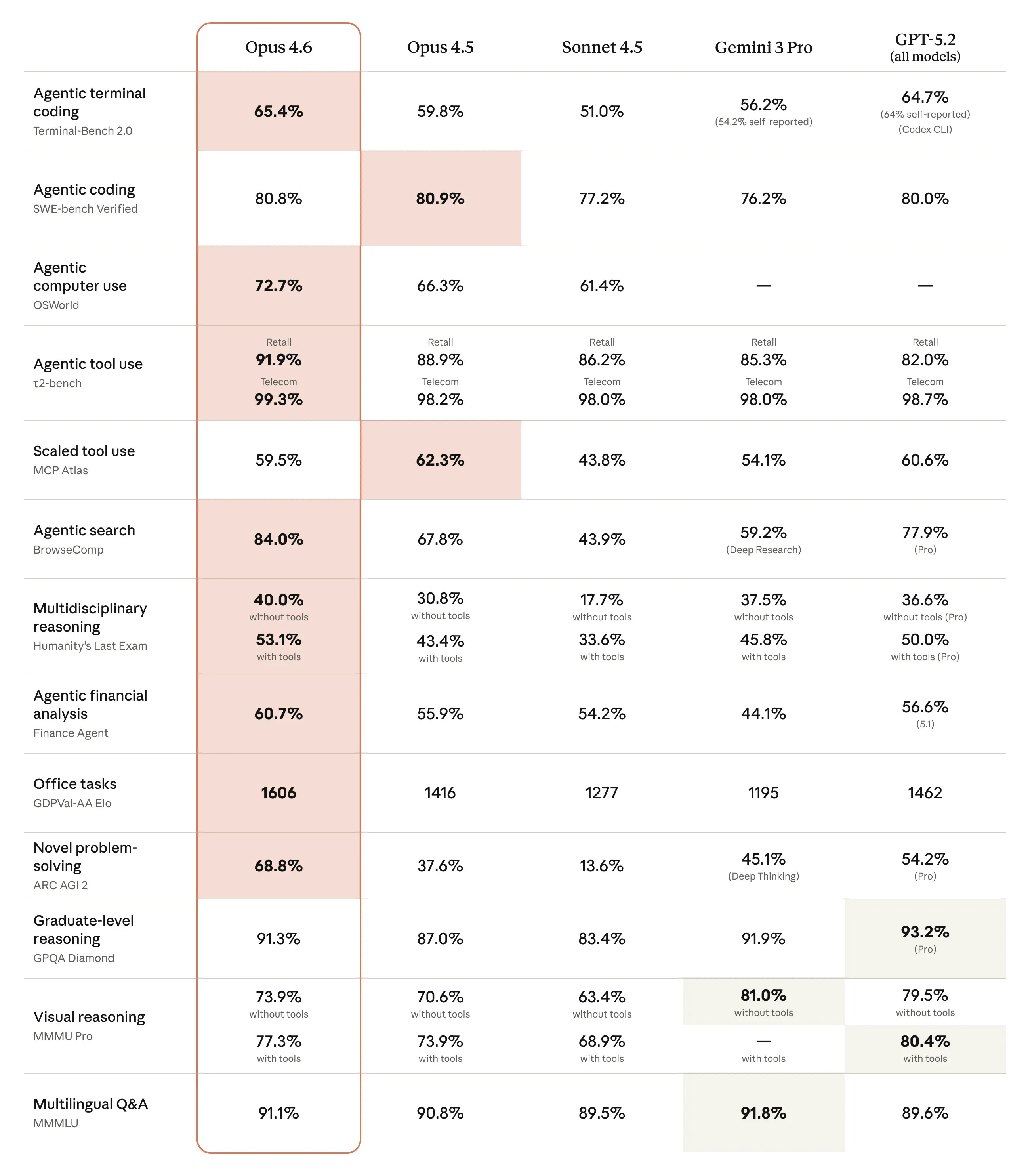
1M token context window (beta). This is the first Opus-class model with this. You can feed it entire codebases, not just files. MRCR v2 — a needle-in-a-haystack test for reasoning over massive context — shows the difference: Opus 4.6 scores 76%. Sonnet 4.5 scores 18.5%.
128k output tokens. No more splitting big tasks into chunks because the model runs out of output space.
Better at staying on track during long agentic tasks. Opus 4.6 plans more carefully, sustains agentic work longer, and catches its own mistakes during code review and debugging. SWE-bench Verified: 80.8% — 4 out of 5 real-world GitHub issues resolved autonomously.
Security work. Before launch, the model found over 500 previously unknown zero-day vulnerabilities in open-source code. All validated by Anthropic’s team or external security researchers.
Pricing stayed the same. $5/$25 per million input/output tokens. No price hike.
These improvements matter. What shipped in Claude Code alongside the model though is where the juice is.
Effort Controls: Stop Overthinking Simple Tasks
Most people will never touch this feature. They should.
Effort is a new parameter that controls how many tokens Claude spends on a response. Not just thinking tokens — everything. Text generation, tool calls, and reasoning depth all change based on the effort level you set.
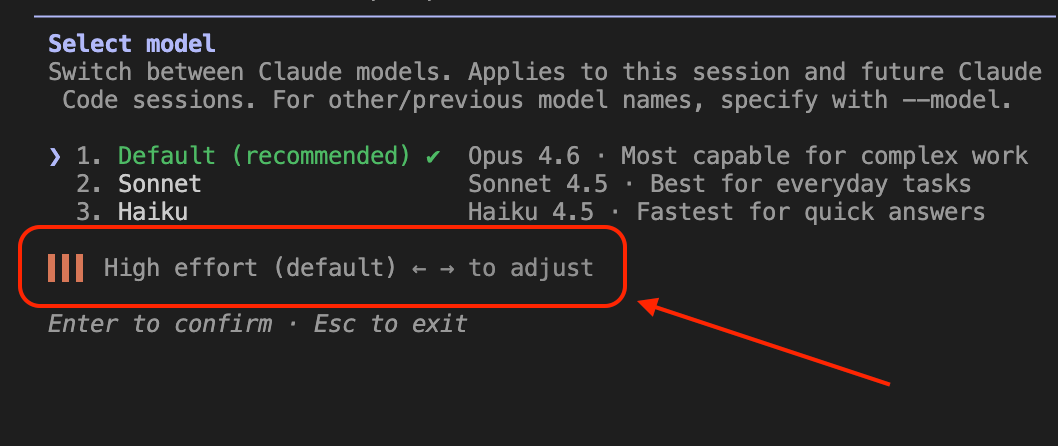
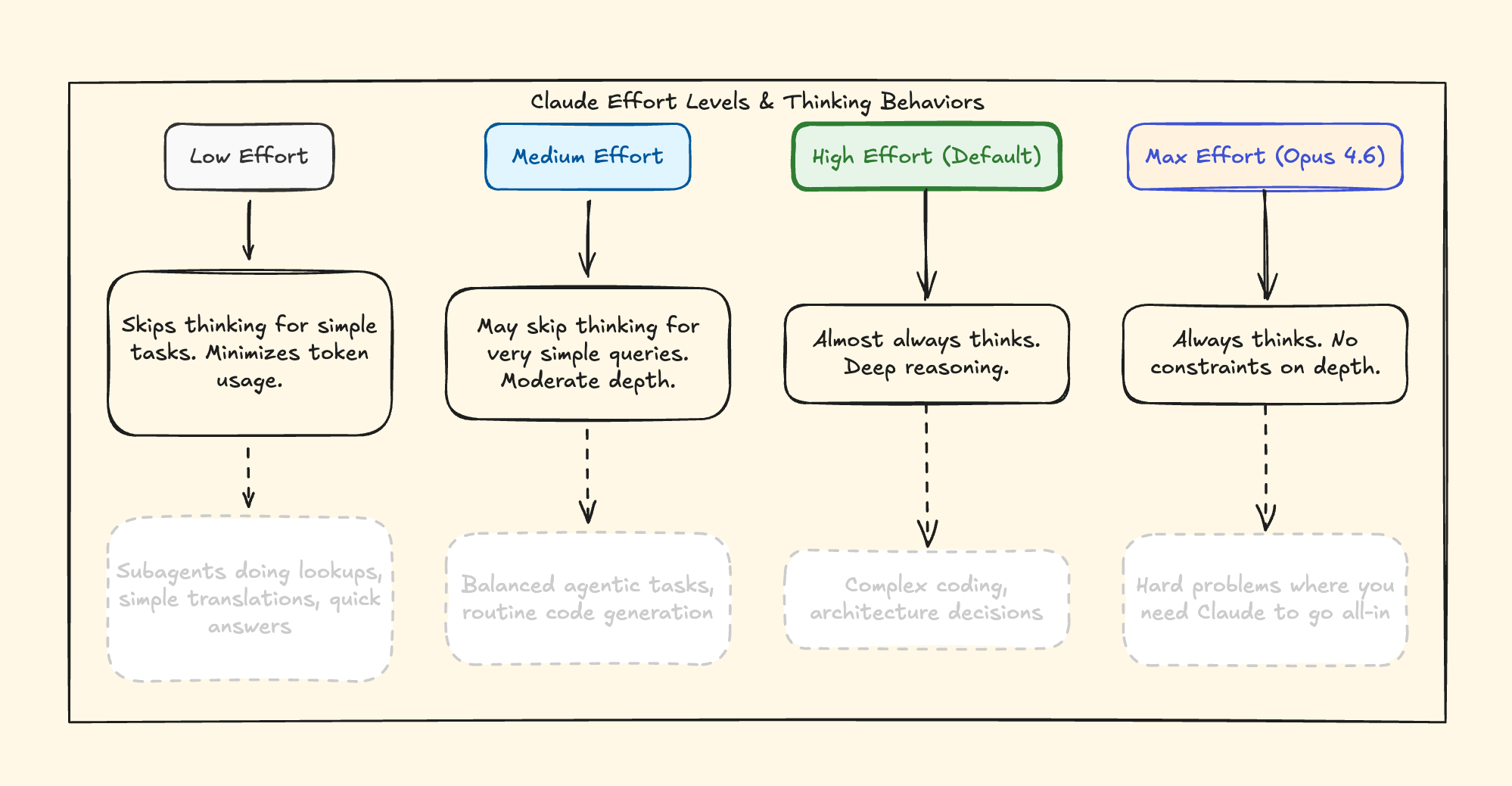
Four levels: low, medium, high (default), and max.
Here’s what most explanations get wrong: this isn’t just a cost optimization tool. It’s a behavioral dial. At `low` effort, Claude makes fewer tool calls, skips preamble, and moves fast. At `max`, Claude thinks with no constraints — deepest analysis, most thorough reasoning. `max` is exclusive to Opus 6.
Here’s what matters: Effort replaces `budget_tokens`, which is now deprecated on Opus 4.6. Instead of manually setting a thinking token budget, you set an effort level and Claude decides how much thinking is appropriate. Anthropic calls this adaptive thinking — Claude evaluates the complexity of each request and allocates thinking accordingly.
I tested this. High effort thinks deeper, but it destroyed my token usage, quite literally. Low effort is faster, and it’s more cost-effective. The key insight: which level to pick still depends on YOUR judgment about task complexity. Remember, the AI doesn’t decide for you — you decide for the AI.
Here’s the API call with effort and adaptive thinking:
python
import anthropic
client = anthropic.Anthropic()
response = client.messages.create(
model=”claude-opus-4-6”,
max_tokens=16000,
thinking={
“type”: “adaptive”
    },
output_config={
“effort”: “low”  # or “medium”, “high”, “max”
    },
messages=[{
“role”: “user”,
“content”: “What is the capital of France?”
    }]
)
Practical recommendation: Default is `high`. Use `low` for subagents doing simple lookups — you’ll see a noticeable speed difference. Use `max` when you’re debugging something genuinely hard and want Claude to exhaust every angle before answering.
Agent Teams: When One Claude Isn’t Enough
“Agent teams are just fancy subagents.” I’ve seen this take everywhere. It’s wrong.
To give you a bit of a background, I wrote the difference between commands, skills, and agents here:

Here’s the actual difference: report back to one main agent. Agent Teams communicate with each other. This matters more than it sounds. With subagents, the main agent has to coordinate everything — receive results, synthesize, decide next steps, delegate again. It’s a hub-and-spoke model. With Agent Teams, you have a lead session that coordinates while teammates work independently, claim tasks from a shared task list, and self-organize. Absolutely killer feature, here’s visual breakdown for you:
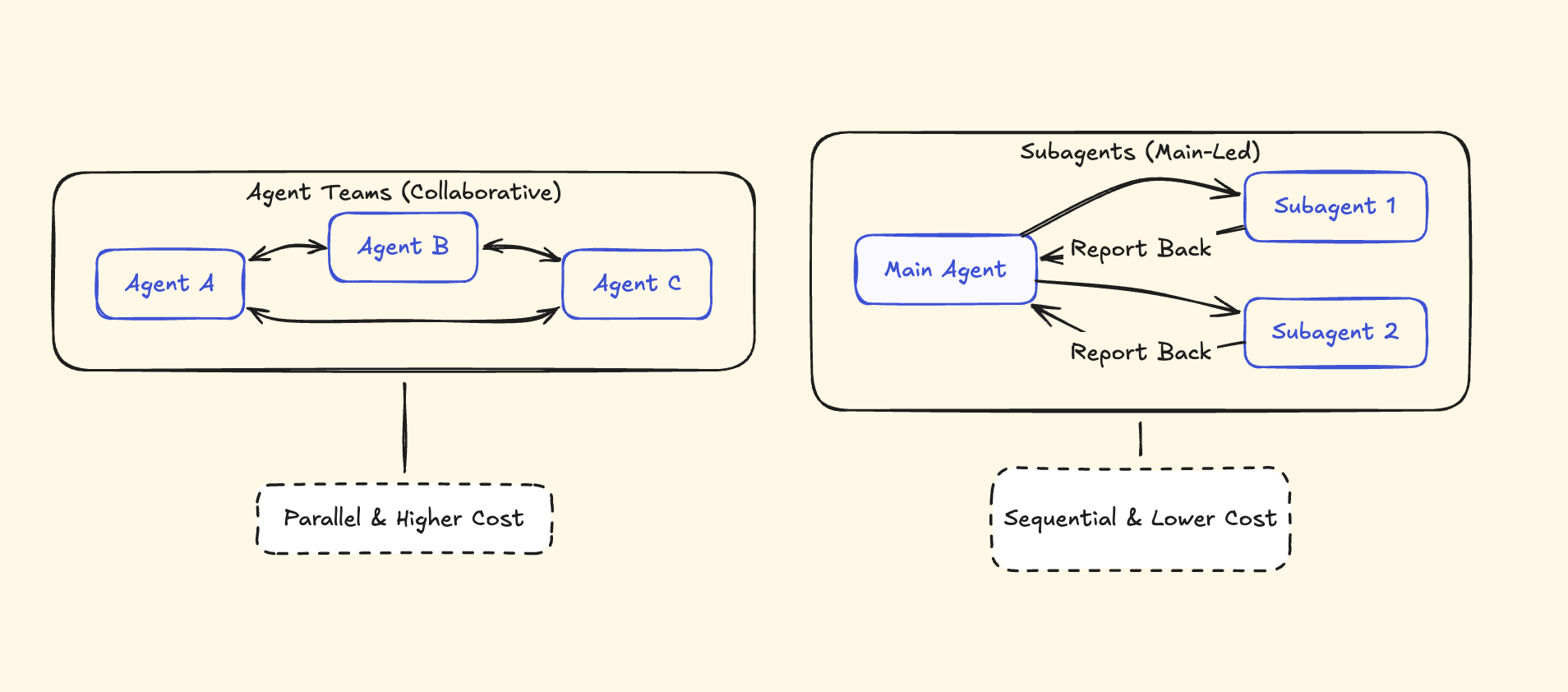
How Agent Teams Work
Agent Teams is an experimental feature. Enable it first by setting `CLAUDE_CODE_EXPERIMENTAL_AGENT_TEAMS=1` in your environment or adding it to your Claude Code settings.
Once enabled, tell Claude to create an agent team. A lead session spins up and coordinates. Teammates get their own context windows and work independently. They share a task list where they claim work themselves — the lead doesn’t micromanage every assignment.
Two ways to see what’s happening:
- In-process switching: Shift+Up/Down to cycle between agents in the same terminal
- Split panes: Use tmux to see all agents working side by side
There’s also a delegate mode that prevents the lead from doing work itself — it only coordinates and delegates. Useful when you want to ensure the lead stays focused on orchestration.
When Agent Teams Actually Make Sense
Parallel code review. Tell Claude to create 3 reviewers: one for security, one for performance, one for test coverage. They work simultaneously, each with their own context and focus. Instead of one sequential review that tries to catch everything, you get three specialized reviews running at once. I really want to try this one.
Debugging with competing hypotheses. Two agents investigate different root causes for the same bug. They don’t step on each other because they’re working in separate contexts.
Cross-layer features. Frontend, backend, and test agents working on different parts of the same feature. Each understands their layer without needing to hold the full stack in context.
When NOT to Use Agent Teams
- Same-file edits. Multiple agents editing the same file creates merge conflicts. Don’t do this.
- Sequential work. If step 2 depends on step 1 finishing, a single agent is simpler.
- Simple tasks. The coordination overhead isn’t worth it for anything one agent can handle in a few minutes.
Agent Teams are high-token-cost by design. Every teammate runs its own full context window. Use them for genuinely complex, parallelizable work — not as a default mode.
/insights: The Command That Roasts Your Coding Habits
This is probably the most interesting feature in this release, and the one almost nobody is talking about.
Type `/insights` in Claude Code. It reads your past 30 days of sessions, processes them, and generates an interactive HTML report about your coding habits.
Anthropic’s Thariq Shubair posted about this feature:

The report doesn’t just show you statistics — it tells you what’s working, what’s slowing you down, and what you should try differently.
The report doesn’t just show stats. It gives you copy-paste code. For example, Mine included 6 suggested CLAUDE.md rules to prevent the exact friction I hit most often. But I really want to write a separate post for this command and break down what I saw in this report.
Adaptive Thinking and Context Compaction in Opus 4.6
Before Opus 4.6, you had to manually toggle extended thinking on or off and set a token budget. Now Claude decides when to think deeply based on the complexity of your request.
Set `thinking.type` to `”adaptive”` in your API call (instead of the old `”enabled”` + `budget_tokens`), and Claude handles the rest. At `high` and `max` effort, it almost always thinks. At `low` effort, it skips thinking for problems that don’t need it.
Adaptive thinking works with the effort parameter — they’re designed to be used together. It also enables interleaved thinking, meaning Claude can reason between tool calls in agentic workflows, not just at the start. The model reasons about what it learned from each tool call before deciding what to do next. For agentic workflows, that’s significant.
No more guessing whether to enable extended thinking. Claude figures it out.
Context Compaction (Beta)
Long agentic sessions used to hit a wall when the context window filled up. Context compaction automatically summarizes older parts of the conversation when approaching context limits, letting Claude continue working without losing track of what happened earlier.
Why this matters: if you’re running a complex multi-step workflow — say, a full codebase refactor — the agent can work for much longer without you manually managing context or restarting the conversation. Super important feature.
Claude Opus 4.6: The Bottom Line
Most people will update to Opus 4.6 and notice responses feel “better.” They’ll never touch Effort controls, never try Agent Teams, never run `/insights`. They’ll get maybe 20% of the value of this release.
The model is the engine, but these features are the steering wheel and it’s important to use them and learn about them. Check out the prompt guide for Claude I wrote a while ago:

FAQ
Q: Is Opus 4.6 worth upgrading to from Opus 4.5?
Yes, no doubt about that. Same pricing, better performance across every benchmark, 1M token context window (beta), 128k output tokens, and adaptive thinking. There’s no downside to switching — it’s a direct upgrade. The effort parameter and adaptive thinking alone make the switch worth it for anyone building agentic workflows.
Q: Do Agent Teams cost significantly more tokens?
Yes. Each teammate runs its own full context window, so token usage scales with the number of agents. Use them for genuinely parallelizable work where the time savings justify the cost — parallel code reviews, cross-layer feature development, debugging with competing hypotheses. For sequential or simple tasks, a single agent is more efficient.
Q: Does /insights send my code to Anthropic’s servers?
The `/insights` command processes your local session transcripts. It uses Haiku to extract facets from your sessions, and the aggregated analysis happens through Claude’s API. Your actual code files aren’t uploaded — the command analyzes session transcripts (your prompts and Claude’s responses) stored locally in `~/.claude/`. The generated HTML report is saved locally on your machine.
Great breakdown Ilia! Especially as you include the when-not-to-use-it section, that is what people really need to understand.
great stuff. anthropic killed it.