

Your CLAUDE.md Is Static. Your AI Forgot Everything Again.
How to turn every Claude Code session into a learning loop — so mistakes get documented once and never repeated.

You start a new Claude Code session on Monday. Claude doesn’t remember the migration fix from last week. Doesn’t know you moved `auth.ts` into a new directory. Three rounds of corrections on Friday to establish a naming convention? Gone.
Most people blame the tool. “Claude has no memory.” “It forgets everything between sessions.”
Claude has exactly the memory you give it. You gave it memory once, when you first set up `CLAUDE.md`, and never touched it again. And every session starts with that sinking feeling — you’re re-explaining things you’ve already explained.
The fix is two 30-second habits. And they compound.
Why a Static CLAUDE.md Wastes Hours Every Month
I’m building a macOS app with Claude. Last week, Claude created a new Swift file for a text shortcuts feature. The app wouldn’t build. Cannot find “ShortcutsService” in scope. I spent 10 minutes figuring out that files created outside Xcode don’t get added to `project.pbxproj` — the file that tells Xcode what to compile. I fixed it, explained it to Claude, moved on.
Two days later, Claude created another Swift file. Same error. Same ten minutes. Because nobody wrote it down.
The /insights post I wrote a week ago

covered how to diagnose friction retroactively. This is different. This is about preventing it in real time — building a system where every session teaches the next one.
The Two Moves That Turn CLAUDE.md Into a Learning Loop
The system that I figured out so far consists of two habits.
The first is reactive. After Claude makes a mistake and you fix it, tell Claude to document the error and the correct approach in CLAUDE.md.
The second is proactive. After you finish implementing a feature, tell Claude to document the architecture, file structure, and conventions in CLAUDE.md.
Session 1, your CLAUDE.md is sparse. Generic rules. “Use TypeScript.” “Follow existing patterns.”
Session 20, it knows your database query patterns, your component naming conventions, which directories hold what, the three mistakes Claude keeps making and how to avoid them, and the architecture of every feature you’ve built.
How to Document Mistakes in CLAUDE.md (Move 1)
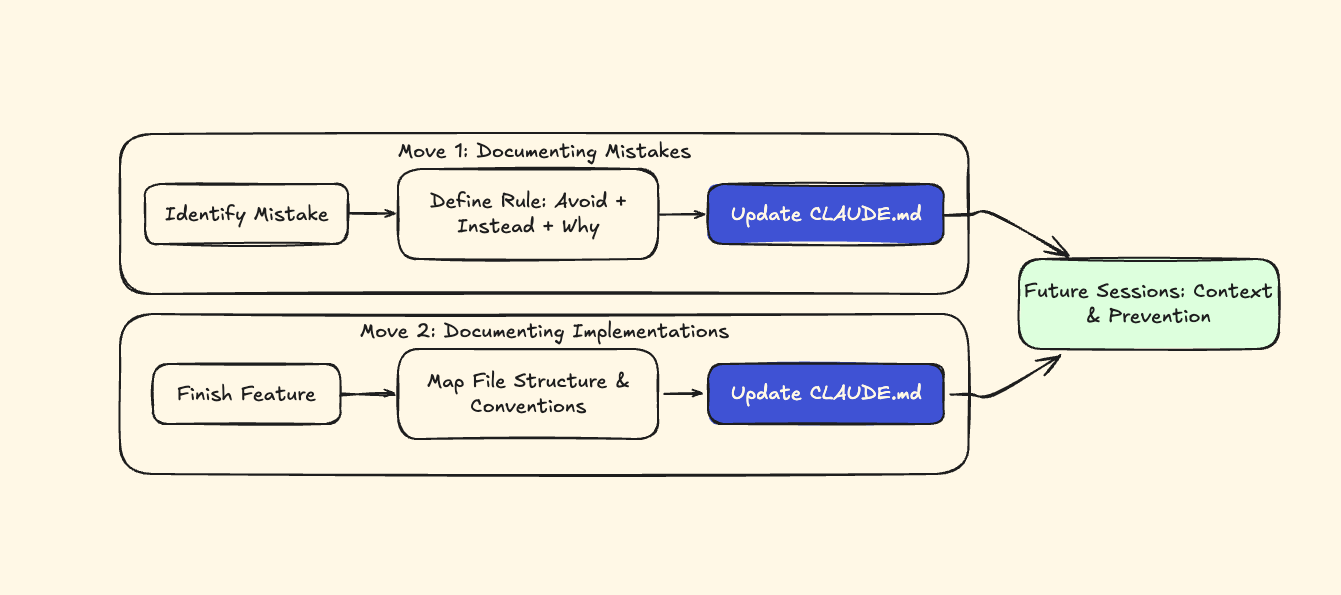
Claude creates a new utility in src/utils/. Your project keeps utilities in lib/. You move it, explain the structure. Next session, another file in src/utils/.
After Claude corrects the mistake, tell it:
“That fix worked. Add to CLAUDE.md: All utilities go in `lib/`, not `src/utils/` — we keep `src/` for components only.”That’s it. 30 seconds. One rule, with reasoning baked in. The generic version you can copy-paste after any fix:
”That fix worked. Add a rule to CLAUDE.md documenting what went wrong and the correct approach, so this mistake doesn’t happen in future sessions.”Notice the rule includes why — “we keep src/ for components only.” Rules without reasoning get misapplied. “Don’t put files in src/utils/” is fragile; Claude might avoid creating utilities at all. “Utilities go in `lib/` because src/ is for components” gives Claude the context to apply it correctly.
One more thing: always tell Claude what to do instead, not just what to avoid. “Never use NSEvent.addGlobalMonitorForEvents” leaves Claude stuck (in my case). “Never use NSEvent.addGlobalMonitorForEvents — use CGEventTap instead” gives it a path forward.
I also like to add architecture of how files, buttons, pieces of code work with each other like this:
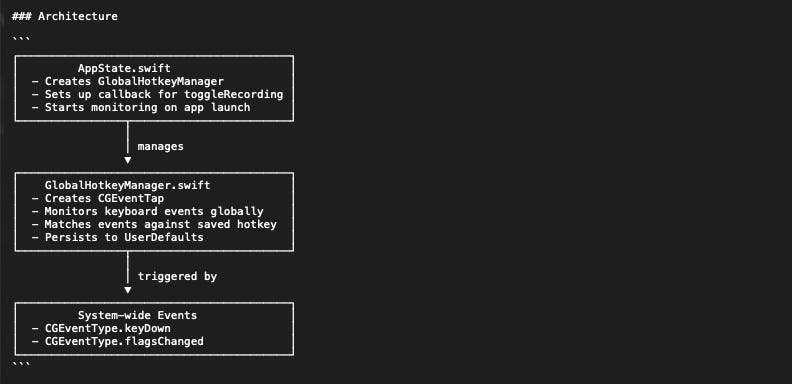
OR:
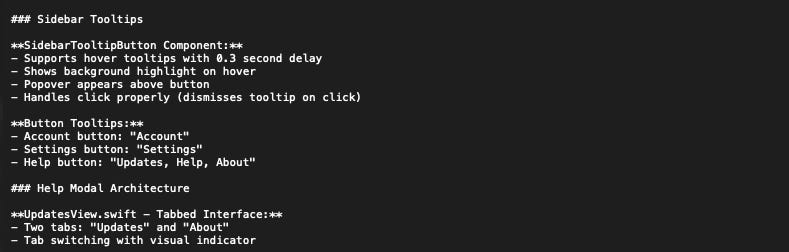
But after learning some things when writing this post, I think I need to dial down on those, or maybe even remove some.
Here’s another example from my project. Claude kept creating Swift files that wouldn’t compile because they weren’t registered in Xcode’s project file. After the second time, I told Claude:
“That fix worked. Add a rule to CLAUDE.md: When creating new Swift files, you must also update project.pbxproj with PBXBuildFile, PBXFileReference, PBXGroup, and PBXSourcesBuildPhase entries. Files created outside Xcode won’t compile otherwise.”Never happened again.
How to Document Implementations in CLAUDE.md (Move 2)
Let’s talk about the Move 2 now. You just spent 45 minutes building an authentication system with Claude. Next week, you need to extend it. New session. Claude has no idea how your auth system works — the same system it helped you build.
After finishing any implementation, tell Claude:
“We just finished implementing the auth system. Document the file structure, approach, and conventions in CLAUDE.md.”The generic version:
”We just finished implementing [feature]. Document the file structure, approach, and conventions in CLAUDE.md.”Here’s what Claude wrote in my project after we finished building a global hotkey system:
## Global Hotkey System

- Uses CGEventTap (not NSEvent.addGlobalMonitorForEvents — unreliable)
- Core: GlobalHotkeyManager.swift (CGEventTap engine)
- UI: SimpleHotkeyRecorder.swift (SwiftUI recorder)
- Requires Accessibility permissions
- Storage: UserDefaults key “GlobalHotkey”
5 lines. That took Claude about 15 seconds to write. The next session, when I needed to add a new keyboard shortcut, Claude already knew the architecture — which file handled what, which approach we’d chosen and why, and the edge case with modifier-only keys. Zero re-explaining.
Keep these entries short. A few bullet points per feature — file locations, key decisions, gotchas. If a feature needs deeper documentation, write it in a separate file and add a pointer: “For auth flow details, see docs/auth-architecture.md.” Claude will open that file when it’s working on auth. It won’t load it every session, which keeps your context budget lean.
How to Organize a Growing CLAUDE.md
Your CLAUDE.md will grow. But it needs structure or it becomes noise.
CLAUDE.md can hit the wall fast. A global hotkey system, text shortcuts, a history feature, and a full UI redesign — all documented in one file. It is definitely useful but can get hard to scan.
Claude already has system prompt that has dozens of instructions, so keep the root CLAUDE.md between 100-200 lines. 300 is the upper limit — past that, Claude starts treating your instructions as background noise instead of rules. Think of it as the executive summary: project overview, critical rules, key conventions.
For everything else, drop focused .md files into .claude/rules/:
./CLAUDE.md ← Core rules, project overview (100-200 lines)
.claude/rules/conventions.md ← Naming, formatting, patterns
.claude/rules/architecture.md ← Feature docs, file structure maps
.claude/rules/mistakes.md ← Documented errors and fixes
Because I like graphs, here’s how it looks like on the graph:
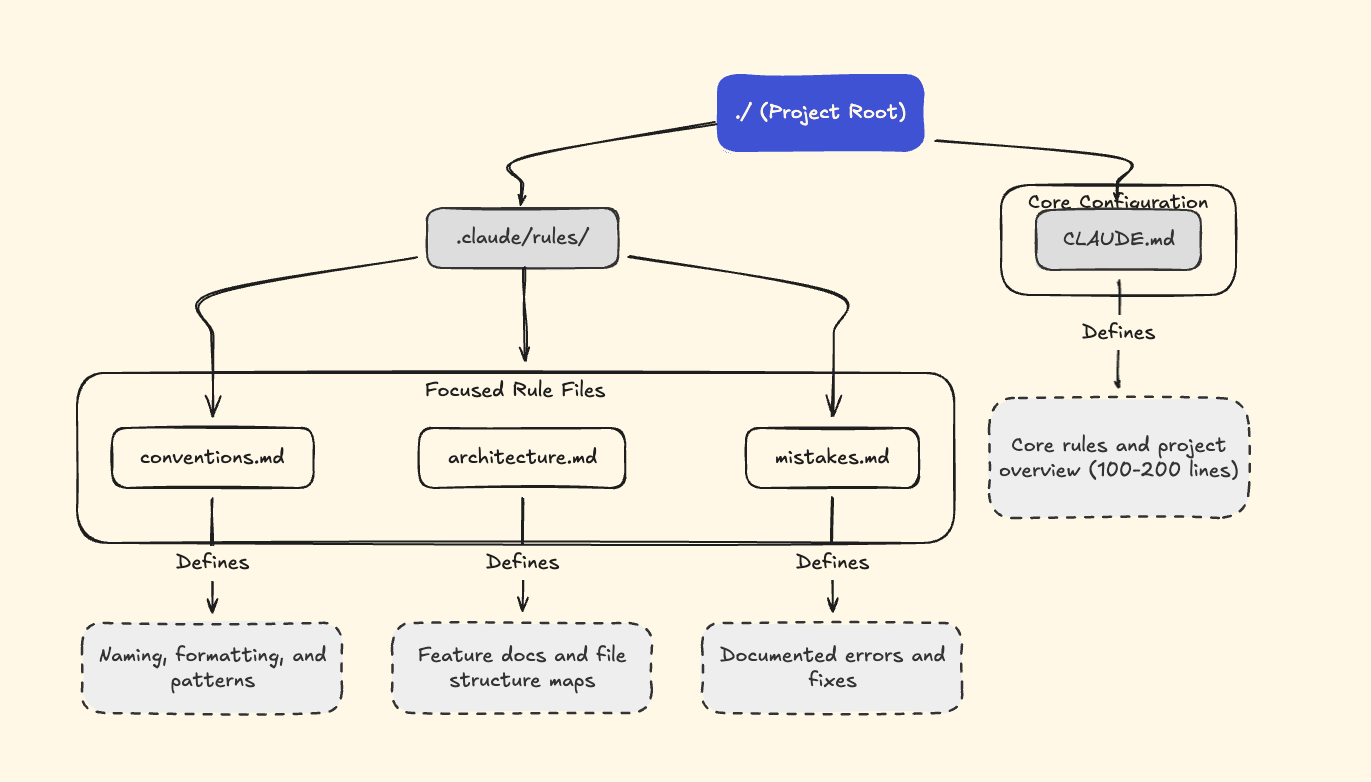
Claude auto-loads every .md file in .claude/rules/ at session start — same priority as the root CLAUDE.md. No special syntax needed. Just drop files in and they’re included.
For deeper documentation that doesn’t need to load every session, use plain text pointers in your rules: “For payment flow details, see docs/payments.md.” Claude will open that file when it’s relevant, without burning context tokens on every startup.
The other half of this is pruning. Every few weeks, read through your CLAUDE.md and ask: does every line still earn its place? Merge rules that overlap. Delete ones that no longer apply. The goal is a curated control panel, not an ever-growing memory dump. If a rule hasn’t prevented a mistake in ten sessions, it’s probably noise.
CLAUDE.md Day One vs Session 30: How Knowledge Compounds
Here’s what my actual CLAUDE.md looked like on day one:
# my-app

- Swift, SwiftUI, macOS app
- Use existing patterns when possible
- Check in before major changes
- Keep changes simple
A couple of sessions later:
# my-app

- Swift, SwiftUI, macOS app
- Use existing patterns when possible
- Check in before major changes
- Keep changes simple

## Global Hotkey System
- Uses CGEventTap for reliable global keyboard monitoring
- Core: GlobalHotkeyManager.swift, SimpleHotkeyRecorder.swift
- Requires Accessibility permissions

## Design System
- DesignSystem.swift: colors, spacing, typography, shadows
- Muted palette (soft blue-gray accent), adapts to light/dark
- .cardStyle(), .hoverEffect(), PrimaryButtonStyle

## History
- HistoryService.swift, HistoryView.swift
- Max 100 entries, newest first, UserDefaults persistence
and more...
These were all accumulated, one by one, over 1-2 sessions. I try to keep entres with just a few lines — short enough that the whole file stays under 200 lines. I haven’t had it happening yet, but if it ever gets too long, I’d move it to a separate file in .claude/rules/ and keep a one-line pointer here.
Try It In Your Next Session
Open your CLAUDE.md right now. Add one thing from your last session that Claude should remember. Copy the two generic prompts from this post and use them for 10 sessions. Compare your CLAUDE.md to what it looked like before.
The payoff is a Claude that starts every session already knowing your project — the patterns, the mistakes, the architecture, the conventions. Not because it remembered. Because you taught it once and it never had to ask again.
FAQ
Q: What’s the difference between CLAUDE.md and Claude Code’s auto-memory?
CLAUDE.md is a file you control. It lives in your project root, you decide what goes in, and Claude loads it at the start of every session. It’s your curated knowledge base. Claude Code auto-memory is Claude’s own note-taking system stored in ~/.claude/, where Claude writes notes to itself between sessions. Think of CLAUDE.md as the official onboarding doc and Claude Code auto-memory as Claude’s personal scratch notes. Both persist across sessions, but you’re the editor of CLAUDE.md.
Q: How long should CLAUDE.md be?
100-200 lines is the sweet spot. 300 is the upper limit — past that, Claude may down-rank your instructions. Split detailed sections into separate .md files under .claude/rules/ — Claude auto-loads everything in that directory at session start. Each file should be focused: conventions in one, architecture in another, mistakes in a third. And prune regularly. If a section gets noisy or a rule hasn’t mattered in weeks, cut it.
Q: Does updating CLAUDE.md every session slow you down?
Each update is a single prompt — about 30 seconds. You’re not writing documentation. You’re telling Claude to write it. The prompts from this post (”Add a rule to CLAUDE.md documenting what went wrong and the correct approach”) do the work for you. Over 30 sessions, that’s roughly 15 minutes invested. Compare that to the hours you’d spend re-explaining the same context if you didn’t.
Great information about how Claude.md works. The rules tip is really helpful as my Claude.md files tends to get bloated fast and I'm constantly trying to cut from it.
Have you seen or tried to compound engineering plugin. It auto captures solutions to problems and saves them down for you using skills and agents. It's a cool concept that Im trying to apply to my work.
I've got one Claude.md at my root directory and then another one in each project-specific subfolder, which definitely helps reduce size and make sure it's got the specific context necessary for whatever it's working on.
I definitely recommend having it put a note in Claude.md telling it to update Claude.md with any important findings while working, especially solutions to problems that have come up. It's a little hit or miss with actually updating it, so I still ask it to write things manually as well, but if I'm in the zone on something and don't remember to ask it to make an update, there's still a good chance it will anyway.