

How I Built a Claude Code Folder That Loads the Right Context Every Time
The 5-layer Context Stack behind Prosper, and a 30-minute template to steal it

For Prosper, Claude Code is my best friend. And every time I start a Claude Code session, Claude already knows:
- My newsletter’s voice, the specific words I never use, the sentence patterns that sound like me
- Which workflows to follow for which tasks
- What prompts to read
- What skills to trigger
- The context behind every prompt I’m about to send
I didn’t paste any of that. I didn’t re-explain it. It loaded automatically, before I typed a word.
This wasn’t always the case. When I decided to start using Claude Code for Prosper, I treated every session like a blank slate. I’d paste the same context into each prompt. Claude would give me solid outputs, but generic in a way that’s hard to name until you see the alternative.
More careful prompts helped, but the improvement had a ceiling. The real problem was the folder.
Claude Code is Anthropic’s AI in your terminal. A command-line interface that reads your project files and operates on them directly. Every session, it looks for a file called `CLAUDE.md` at the root of your folder. Whatever’s there, Claude reads before responding.
Most people write a list of instructions in `CLAUDE.md` and stop there. That works. But there’s a different way to use it that changes everything. If you’ve used Claude Code a handful of times and keep re-explaining the same things each session, this post is for you.
Two things to do with this post:
1) Use the system for your own project
2) Send it to whoever just asked you “how do I actually set this up?”
I’ve been running Prosper, the folder behind this newsletter, in Claude Code since January 2026. The system I’m about to walk through is live. Not a framework I designed for this post. The folder I work in every day.
By the end of this post, you’ll have:
- A clear model for how CLAUDE.md works as a router
- The full Context Stack: all 5 layers, with newsletter-prosper as the live example
- A downloadable template folder you can drop into any project today
- A one-prompt shortcut that builds your CLAUDE.md and voice-guidelines.md from a conversation
What CLAUDE.md actually does
Claude reads `CLAUDE.md` first. Every session, every time. Whatever you put in there, Claude has access to before you type a single prompt.
Most people use “CLAUDE.md” as a configuration file. A flat document of instructions, preferences, and rules. That works, don’t get me wrong. But as the file grows, two things happen: Claude starts to skim, and everything loads every session whether it’s relevant to the current task or no.
I wrote about this problem here:
Your CLAUDE.md Is Static. Your AI Forgot Everything Again.

You start a new Claude Code session on Monday. Claude doesn’t remember the migration fix from last week. Doesn’t know you moved `auth.ts` into a new directory. Three rounds of corrections on Friday to establish a naming convention? Gone.
There’s a different approach. Use `CLAUDE.md` as a routing table.
A routing table doesn’t contain all the information. It tells you where to find it. My `CLAUDE.md` in newsletter-prosper folder is about 150 lines. It describes what exists in the folder and tells Claude when to load each file before writing tasks, load the voice files; before research tasks, load the research rules; for specific workflows, load the matching prompt file.
Here’s an example:
Voice & style (load before drafting - voice floor):
- `voice_profile.md` - identity, beliefs, personality
- `writing_rules.md` - banned AI vocabulary, structural tells
- `copywriting_rules.md` - persuasion + headline principles
- `marketing_rules.md` - positioning + audience strategy
That block tells Claude: before writing anything, load these four files. Not before research. Not before running a skill. Before writing.
The instructions aren’t in `CLAUDE.md`. `CLAUDE.md` knows where the instructions are. More on that below.
The 5-Layer Context Stack For Claude Code
That routing logic is the first layer of what I call the Context Stack. It’s a 5-layer system where each layer has one job and loads at a specific trigger.
Here’s the full picture before I break each one down:
- Layer 1: The Router - Always-on. First thing every session.
- Layer 2: The Voice Floor - Task-triggered. Loads before any writing task.
- Layer 3: The Skill Library - Task-triggered. Loads before a specific workflow.
- Layer 4: Working Memory - On-demand. Recent context, metrics, ideas.
- Layer 5: The External Brain - On-demand. Long-term curated memory.
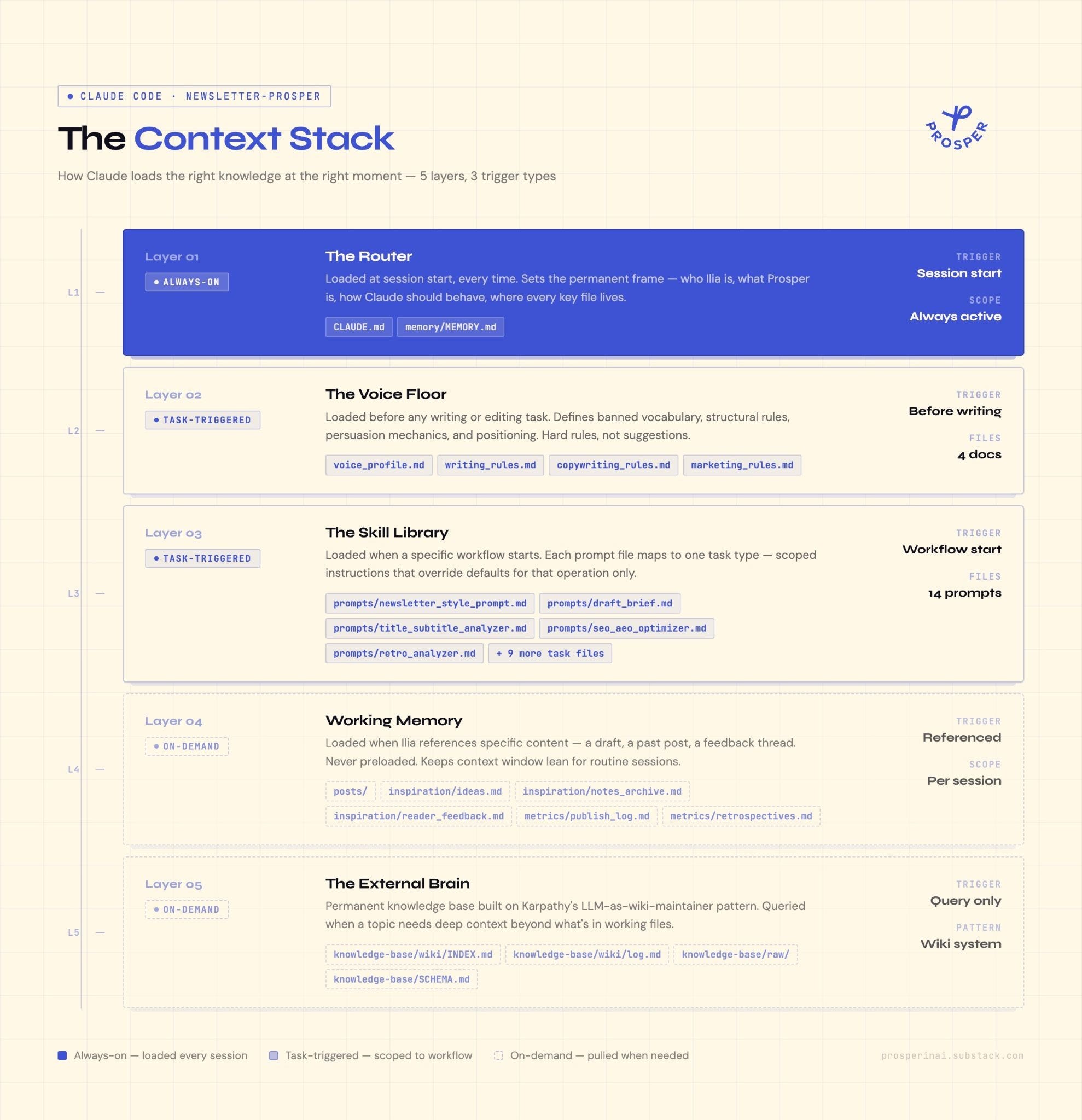
Nothing loads twice. Nothing loads unnecessarily. Each file in each layer stays short and focused, which I’ll explain in a dedicated section, because that’s the part that determines whether the system actually works.
Behind this paywall you get the full system: a breakdown of all 5 layers with real examples from the Prosper folder, the Short-File Principle that determines whether this actually works, and the 30-minute setup guide with templates you can copy directly. Plus a one-prompt shortcut that builds your CLAUDE.md and voice-guidelines.md from a conversation with Claude, and a downloadable template folder with 5 ready-to-use files.
Layer 1: The Router
Your “CLAUDE.md” should be a map.
